Tag: cyber security

  • Mega Facebook data breach sees Meta fined $277m

    Mega Facebook data breach sees Meta fined $277m

    There’s some bad news for Meta, in the form of a $277 million fine related to a data breach which impacted no fewer than 500 million users. The fine, issued by the Irish Data Protection Commission, is a result of the fallout from scraped data posted to a hacking forum in 2019. As The Guardian notes, this brings the current running tally of fines to close to a billion dollars in fines from the EU since September 2021. How did we arrive at this increasingly spectacular figure?

    Making contact in the worst way possible

    It all went wrong for Meta this time around thanks to a Contacts Import tool, designed to connect phone numbers with Facebook IDs. Attackers figured out a way to scrape user information and then used it to build up a profile of the users.

    This data eventually worked its way onto the forum. It contained a wealth of data including name, gender, DOB, mobile number, emails, and more.

    From the Data Protection Commission website statement:

    “The decision, which was adopted on Friday, 25 November 2022, records findings of infringement of Articles 25(1) and 25(2) GDPR. The decision imposed a reprimand and an order requiring MPIL to bring its processing into compliance by taking a range of specified remedial actions within a particular timeframe.”

    Which articles were infringed?

    Article 25(1) and Article 25(2) are the rules where Meta found itself in hot water with the DPC, which are summarised below:

    Article 25(1): 

    “…the controller shall, both at the time of the determination of the means for processing and at the time of the processing itself, implement appropriate technical and organisational measures, such as pseudonymisation, which are designed to implement data-protection principles, such as data minimisation, in an effective manner and to integrate the necessary safeguards into the processing in order to meet the requirements of this Regulation and protect the rights of data subjects.”

    Article 25(2):

    “The controller shall implement appropriate technical and organisational measures for ensuring that, by default, only personal data which are necessary for each specific purpose of the processing are processed. That obligation applies to the amount of personal data collected, the extent of their processing, the period of their storage and their accessibility. In particular, such measures shall ensure that by default personal data are not made accessible without the individual’s intervention to an indefinite number of natural persons.”

    This infringement of the GDPR articles was enough to eventually result in the eye-watering fine given to Meta. Quite the blow, considering it wasn’t so long ago that a $419m fine was applied as a result of breaches of children’s privacy rights on Instagram.

    Scrape it to make it

    Scraping data remains a major thorn in the side for social networks and other sites responsible for the safety of user data. Just recently, Twitter has felt the fallout of scraped user data which includes phone numbers and email addresses. Elsewhere, LinkedIn is going legal to prevent users scraping data only available for logged in members.

    Will these fines have any lasting impact on social media giants to change behaviour and proactively shore up the defences which are breached time and again? Or will the increasingly visible phrase “Just the cost of doing business here” become the norm as big business sets aside large amounts for a rainy and fine laden day?

    We have to hope it’s the former and not the latter, because the last thing we need to see creeping in against the onset of large fines is complacency. It’s crucial that companies entrusted with our data do everything possible to prevent the scraping of data, from tools specifically about making data connections in the first place.

    Credits: Malware Bytes Lab

  • Google Rolls Out New Chrome Browser Update to Patch Yet Another Zero-Day Vulnerability

    Google Rolls Out New Chrome Browser Update to Patch Yet Another Zero-Day Vulnerability

    Search giant Google on Friday released an out-of-band security update to fix a new actively exploited zero-day flaw in its Chrome web browser.

    The high-severity flaw, tracked as CVE-2022-4262, concerns a type confusion bug in the V8 JavaScript engine. Clement Lecigne of Google’s Threat Analysis Group (TAG) has been credited with reporting the issue on November 29, 2022.

    Type confusion vulnerabilities could be weaponized by threat actors to perform out-of-bounds memory access, or lead to a crash and arbitrary code execution.

    According to the NIST’s National Vulnerability Database, the flaw permits a “remote attacker to potentially exploit heap corruption via a crafted HTML page.”

    Google acknowledged active exploitation of the vulnerability but stopped short of sharing additional specifics to prevent further abuse.

    CVE-2022-4262 is the fourth actively exploited type confusion flaw in Chrome that Google has addressed since the start of the year. It’s also the ninth zero-day flaw attackers have exploited in the wild in 2022 –

    Users are recommended to upgrade to version 108.0.5359.94 for macOS and Linux and 108.0.5359.94/.95 for Windows to mitigate potential threats.

    Users of Chromium-based browsers such as Microsoft Edge, Brave, Opera, and Vivaldi are also advised to apply the fixes as and when they become available.

    Credits: The Hackers News

  • Worok hackers hide new malware in PNGs using steganography

    Worok hackers hide new malware in PNGs using steganography

    A threat group tracked as ‘Worok’ hides malware within PNG images to infect victims’ machines with information-stealing malware without raising alarms.

    This has been confirmed by researchers at Avast, who built upon the findings of ESET, the first to spot and report on Worok’s activity in early September 2022.

    ESET warned that Worok targeted high-profile victims, including government entities in the Middle East, Southeast Asia, and South Africa, but their visibility into the group’s attack chain was limited. 

    Avast’s report is based on additional artifacts the company captured from Worok attacks, confirming ESET’s assumptions about the nature of the PNG files and adding new information on the type of malware payloads and the data exfiltration method.

    Hiding malware in PNG files

    While the method used to breach networks remains unknown, Avast believes Worok likely uses DLL sideloading to execute the CLRLoader malware loader into memory.

    This is based on evidence from compromised machines, where Avast’s researchers found four DLLs containing the CLRLoader code.

    Next, the CLRLoader loads the second-stage DLL (PNGLoader), which extracts bytes embedded in PNG files and uses them to assemble two executables.

    Worok's complete infection chain
    Worok’s complete infection chain
    Source: Avast

    Hiding payload in PNGs

    Steganography is concealing code inside image files that appear normal when opened in an image viewer.

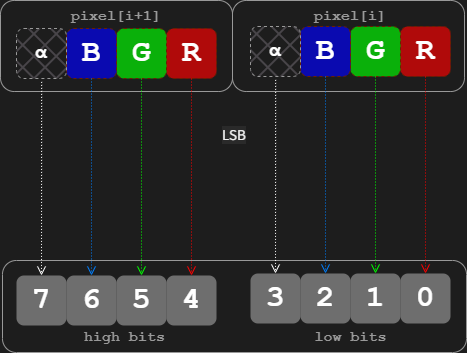
    In the case of Worok, Avast says the threat actors used a technique called “least significant bit (LSB) encoding,” which embeds small chunks of the malicious code in the least important bits of the image’s pixels.

    LSB encoding on image files
    LSB on image pixels
    Source: Avast

    The first payload extracted from those bits by PNGLoader is a PowerShell script that neither ESET nor Avast could retrieve.

    The second payload hiding in the PNG files is a custom .NET C# info-stealer (DropBoxControl) that abuses the DropBox file hosting service for C2 communication, file exfiltration, and more.

    The PNG image containing the second payload is the following:

    A PNG image file containing the info-stealer
    Source: Avast​​​​

    DropBox abuse

    The ‘DropBoxControl’ malware uses an actor-controlled DropBox account to receive data and commands or upload files from the compromised machine.

    The commands are stored in encrypted files on the threat actor’s DropBox repository that the malware accesses periodically to retrieve pending actions.​

    Form of DropBox files
    Form of DropBox files, TaskType is command
    Source: Avast

    The supported commands are the following:

    • Run “cmd /c” with the given parameters
    • Launch an executable with given parameters
    • Download data from DropBox to the device
    • Upload data from the device to DropBox
    • Delete data on the victim’s system
    • Rename data on the victim’s system
    • Exfiltrate file info from a defined directory
    • Set a new directory for the backdoor
    • Exfiltrate system information
    • Update the backdoor’s configuration

    These functions indicate that Worok is a cyberespionage group interested in stealthy data exfiltration, lateral movement, and spying on the infected device.

    Avast comments that the tools sampled from Worok attacks aren’t circulating in the wild, so they’re likely used exclusively by the threat group.

    Credits: bleepingcomputer.com

  • FBI warns about ongoing Google Voice authentication scams

    The Federal Bureau of Investigation (FBI) says Americans who share their phone number online are being targeted by Google Voice authentication scams.

    As the federal law enforcement agency explains, the fraudsters are targeting those who have posted their phone number as a form of contact when trying to sell various items on online marketplaces or social media apps.

    “Recently, we have also been getting reports of people who are getting targeted in other locations, including sites where you post about lost pets,” the FBI said.

    If successful, they will set up a Google Voice account in their victims’ names or hijack their Gmail accounts which will later be used in other fraud schemes or in phishing attacks.

    The scammers will reach out to their targets via text messages or email showing their interest in the item put up for sale, asking the seller to verify their offer is legitimate and they’re a real person and not a bot by sharing an authentication code they’ll receive from Google.

    “What he is really doing is setting up a Google Voice account in your name using your real phone number as verification,” the agency added.

    “Once set up, he can use that Google Voice account to conduct any number of scams against other victims that won’t come back directly to him. He can also use that code to gain access to, and take over, your Gmail account.”

    Also Read: MASSIVE ATTACK AGAINST 1.6 MILLION WORDPRESS SITES UNDERWAY

    What to do if you’re the target of an authentication scam

    The FBI advises victims of Google Voice authentication scams to check Google’s support website for information on how to retake control of their Google Voice account and reclaim their Voice number.

    The federal agency also provides the following tips on to avoid getting scammed in the first place if you’re ever targeted:

    • Never share a Google verification code with others.
    • Only deal with buyers, sellers, and Fluffy-finders in person. If money is to exchange hands, make sure you are using legitimate payment processors.
    • Don’t give out your email address to buyers/sellers conducting business via phone.
    • Don’t let someone rush you into a sale. If they are pressuring you to respond, they are likely trying to manipulate you into acting without thinking.

    Those who believe they’ve fallen victim to online scams, are advised to report it to the FBI’s Internet Crime Complaint Center at www.ic3.gov or to call their local FBI office. 

    Credits: bleepingcomputer.com

  • AT&T Customers Are Being Infected By A Massive Malware Botnet But User Data Is Allegedly Secure

    AT&T Customers Are Being Infected By A Massive Malware Botnet But User Data Is Allegedly Secure

    If you are an AT&T enterprise customer with some older technology on the edge of your network, your infrastructure may be under attack by a Russian botnet dubbed EwDoor.

    In late October this year, researchers at 360 Netlab discovered a threat actor attacking Edgewater Networks’ devices using the four-year-old CVE-2017-6079. This vulnerability, when exploited, could allow the attacker to execute commands via a hidden page embedded in the firmware dating back to 2006, according to the National Institute of Standards and Technology’s database.

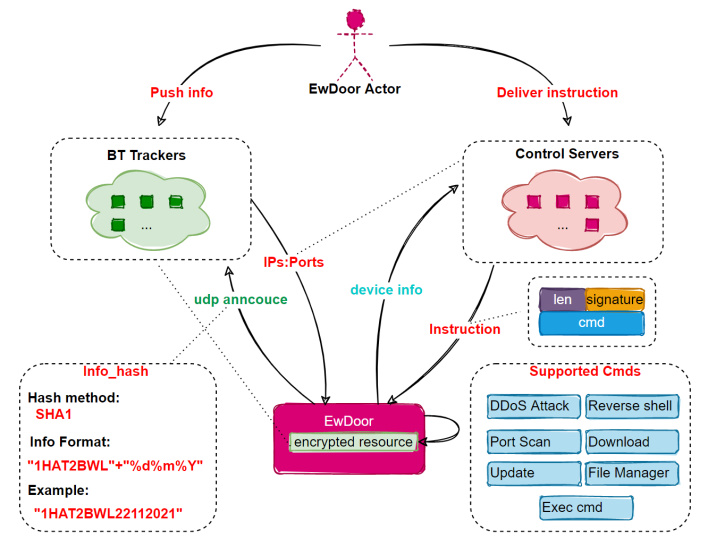
    ewdoor layout att customers under attack by botnet
    The basic logic of EwDoor’s operations.

    Subsequently, the researchers named this botnet EwDoor after “it’s targeting of Edgewater producers and its Backdoor feature.” The initial version of this network used a multi-command-and-control (C2) redundancy mechanism, allowing the researchers to register one of the C2 domains and gain some insights into EwDoor. They found that the 5,700 attacked devices are “EdgeMarc Enterprise Session Border Controllers” belonging to AT&T and geographically located within the United States.

    Also Read: HACKERS DEPLOY LINUX MALWARE, WEB SKIMMER ON E-COMMERCE SERVERS

    Since that initial insight was gained, the researchers briefly lost sight of EwDoor, but found that there have been three known updates for the network that “can be summarized into 2 main categories of DDoS attacks and Backdoor.” The thought is that with these capabilities, which also include “self-updating, port scanning, file management, reverse SHELL, and the execution of arbitrary commands,” the threat actor wishes to deny service and gather sensitive information like call logs.

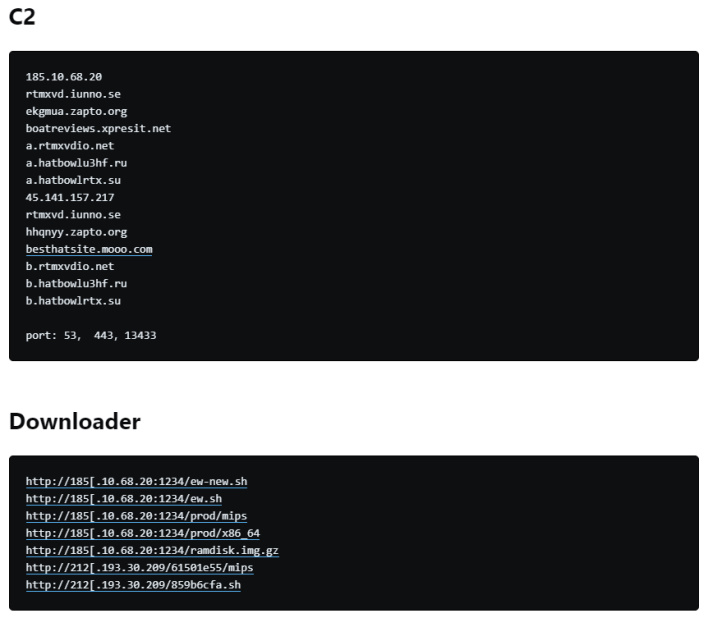
    c2 info2 att customers under attack by botnet

    Interestingly, the team at 360 Netlab was able to deconstruct the code from EwDoor and found some of the C2 domains and the locations for the downloaded files. Though these have likely changed since the research was published, it shows that the threat actor’s efforts to obfuscate their work had flaws.

    In any event, AT&T spoke with BleepingComputer and stated that there was “no evidence of customers’ data being accessed as a result of these attacks.” Specifically, AT&T previously identified this issue, and the company has “taken steps to mitigate it and continue[s] to investigate.” Despite this reassurance, it is still concerning that something like this could happen, especially considering the crux of this attack is a highly dangerous four-year-old vulnerability.

    Credits: HOT HARDWARE

  • Nine WiFi routers used by millions were vulnerable to 226 flaws

    Nine WiFi routers used by millions were vulnerable to 226 flaws

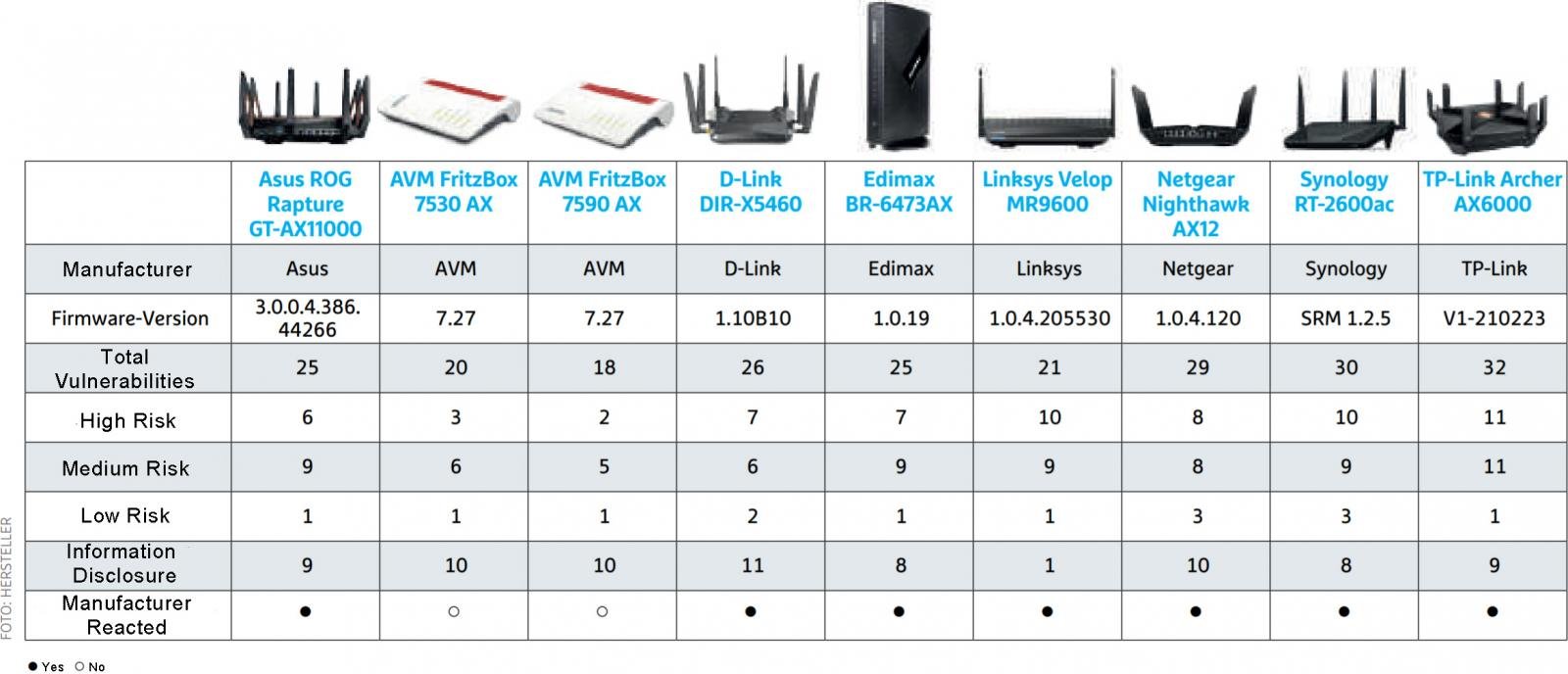
    Security researchers analyzed nine popular WiFi routers and found a total of 226 potential vulnerabilities in them, even when running the latest firmware.

    The tested routers are made by Asus, AVM, D-Link, Netgear, Edimax, TP-Link, Synology, and Linksys, and are used by millions of people.

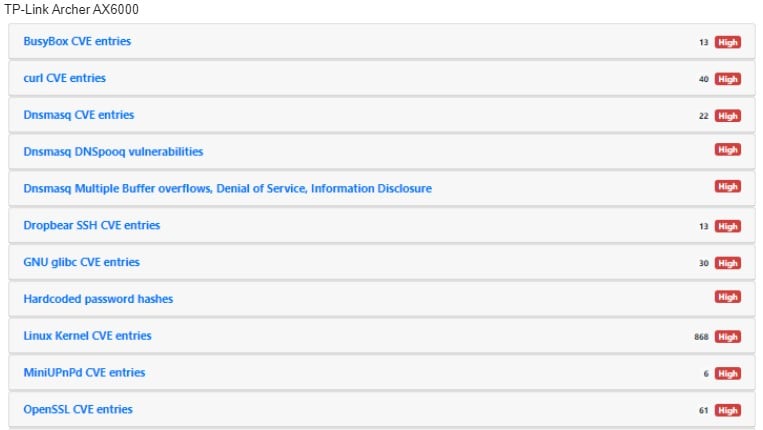
    The front-runners in terms of the number of vulnerabilities are the TP-Link Archer AX6000, having 32 flaws, and the Synology RT-2600ac, which has 30 security bugs.

    High-severity flaws affecting TP-Link Archer AX6000
    High-severity flaws affecting TP-Link Archer AX6000
    Source: IoT Inspector

    The testing process

    Researchers at IoT Inspector carried out the security tests in collaboration with CHIP magazine, focusing on models used mainly by small firms and home users.

    “For Chip’s router evaluation, vendors provided them with current models, which were upgrade to the latest firmware version,” Florian Lukavsky, CTO & Founder at IoT Inspector, told BleepingComputer via email.

    “The firmware versions were automatically analyzed by IoT Inspector and checked for more than 5,000 CVEs and other security issues.”

    Their findings showed that many of the routers were still vulnerable to publicly disclosed vulnerabilities, even when using the latest firmware, as illustrated in the table below.

    Router models and flaws categorized as per their severity
    Router models and flaws categorized as per their severity
    Source: CHIP
    Left column translated by BleepingComputer

    While not all flaws carried the same risk, the team found some common problems that affected most of the tested models:

    • Outdated Linux kernel in the firmware
    • Outdated multimedia and VPN functions
    • Over-reliance on older versions of BusyBox
    • Use of weak default passwords like “admin”
    • Presence of hardcoded credentials in plain text form

    Jan Wendenburg, the CEO of IoT Inspector, noted that one of the most important ways of securing a router is to change the default password when you first configure the device.

    “Changing passwords on first use and enabling the automatic update function must be standard practice on all IoT devices, whether the device is used at home or in a corporate network.” explained Wendenburg.

    “The greatest danger, besides vulnerabilities introduced by manufacturers, is using an IoT device according to the motto ‘plug, play and forget’.”

    Also Read: HACKERS DEPLOY LINUX MALWARE, WEB SKIMMER ON E-COMMERCE SERVERS

    Extracting an encryption key

    The researchers didn’t publish many technical details about their findings, except for one case concerning the extraction of the encryption key for D-Link router firmware images.

    The team found a way to gain local privileges on a D-Link DIR-X1560 and get shell access via the physical UART debug interface.

    Next, they dumped the whole filesystem using built-in BusyBox commands and then located the binary responsible for the decryption routine.

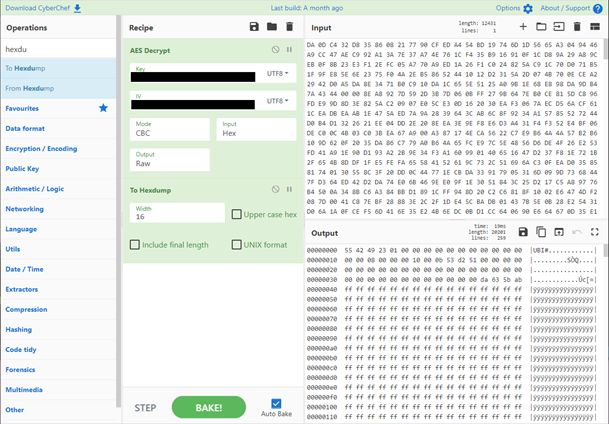
    By analyzing the corresponding variables and functions, the researchers eventually extracted the AES key used for the firmware encryption.

    Deriving the AES key on CyberChef
    Deriving the AES key on CyberChef
    Source: IoT Inspector

    Using that key, a threat actor can send malicious firmware image updates to pass verification checks on the device, potentially planting malware on the router.

    Such problems can be solved with full-disk encryption that secures locally stored images, but this practice is not common.

    Manufacturers responded quickly

    All of the affected manufacturers responded to the researchers’ findings and released firmware patches.

    CHIP’s author Jörg Geiger commented that the router vendors addressed most of the security flaws identified by the working group, but not all of them.

    The researchers have told Bleeping Computer that the unpatched flaws are mostly lower importance vulnerabilities. However, they clarified that no follow-up tests were done to confirm that the security updates fixed the reported issues.

    The vendor responses to CHIP (translated) were the following:

    • Asus: Asus examined every single point of the analysis and presented us with a detailed answer. Asus has patched the outdated BusyBox version, and there are also updates for “curl” and the web server. The pointed out that password problems were temp files that the process removes when it is terminated. They do not pose a risk.
    • D-Link: D-Link thanked us briefly for the information and published a firmware update that fixes the problems mentioned.
    • Edimax: Edimax doesn’t seem to have invested too much time in checking the problems, but at the end there was a firmware update that fixed some of the gaps.
    • Linksys: Linksys has taken a position on all issues classified as “high” and “medium”. Default passwords will be avoided in the future; there is a firmware update for the remaining problems.
    • Netgear: At Netgear they worked hard and took a close look at all problems. Netgear sees some of the “high” issues as less of a problem. There are updates for DNSmasq and iPerf, other reported problems should be observed first.
    • Synology: Synology is addressing the issues we mentioned with a major update to the Linux kernel. BusyBox and PHP will be updated to new versions and Synology will soon be cleaning up the certificates. Incidentally, not only the routers benefit from this, but also other Synology devices.
    • TP-Link: With updates from BusyBox, CURL and DNSmasq, TP-Link eliminates many problems. There is no new kernel, but they plan more than 50 fixes for the operating system

    If you are using any of the models mentioned in the report, you are advised to apply the available security updates, enable “automatic updates”, and change the default password to one that is unique and strong.

    Additionally, you should disable remote access, UPnP (Universal Plug and Play), and the WPS (WiFi Protected Setup) functions if you’re not actively using them.

    Bleeping Computer has contacted all of the affected manufacturers requesting a comment on the above, and we will update this piece as soon as we receive their response.

    Credits: BleepingComputer.com

  • Hackers deploy Linux malware, web skimmer on e-commerce servers

    Hackers deploy Linux malware, web skimmer on e-commerce servers

    Security researchers discovered that attackers are also deploying a Linux backdoor on compromised e-commerce servers after injecting a credit card skimmer into online shops’ websites.

    The PHP-coded web skimmer (a script designed to steal and exfiltrate customers’ payment and personal info) is added and camouflaged as a .JPG image file in the /app/design/frontend/ folder.

    The attackers use this script to download and inject fake payment forms on checkout pages displayed to customers by the hacked online shop.

    “We found that the attacker started with automated eCommerce attack probes, testing for dozens of weaknesses in common online store platforms,” the Sansec Threat Research Team revealed.

    “After a day and a half, the attacker found a file upload vulnerability in one of the store’s plugins. S/he then uploaded a webshell and modified the server code to intercept customer data.”

    Linux malware undetected by security software

    The Golang-based malware, spotted by Dutch cyber-security company Sansec on the same server, was downloaded and executed on breached servers as a linux_avp executable.

    Once launched, it immediately removes itself from the disk and camouflages itself as a “ps -ef” process that would be used to get a list of currently-running processes.

    Also Read: These 23 fake Android apps are dangerous spyware, so delete them now

    While analyzing the linux_avp backdoor, Sansec found that it waits for commands from a Beijing server hosted on Alibaba’s network.

    They also discovered that the malware would gain persistence by adding a new crontab entry that would redownload the malicious payload from its command-and-control server and reinstall the backdoor if detected and removed or the server restarts.

    Until now, this backdoor remains undetected by anti-malware engines on VirusTotal even though a sample was first uploaded more than one month ago, on October 8th.

    The uploader might be the linux_avp creator since it was submitted one day after researchers at Dutch cyber-security company Sansec spotted it while investigating the e-commerce site breach.

  • PRIVACY REPORT: WHAT ANDROID DOES IN THE BACKGROUND

    PRIVACY REPORT: WHAT ANDROID DOES IN THE BACKGROUND

    We’ve come a long way from the Internet of the 90s and early 00s. Not just in terms of technology, capabilities, and culture, but in the attitude most of us take when accessing the ‘net. In those early days most users had a militant drive to keep any personal or identifying information to themselves beyond the occasional (and often completely fictional) a/s/l, and before eBay and Amazon normalized online shopping it was unheard of to even type in a credit card number. On today’s internet we do all of these things with reckless abandon, and to make matters worse most of us carry around a device which not only holds all of our personal information but also reports everything about us, from our browsing habits to our locations, back to databases to be stored indefinitely.

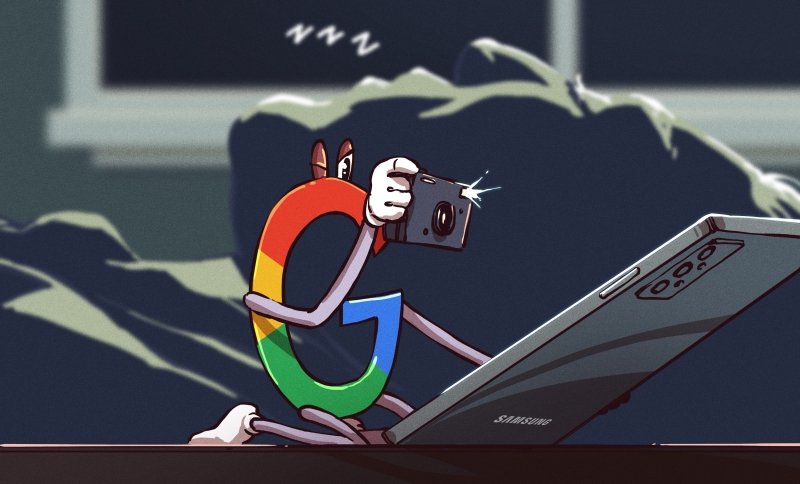
    It was always known that both popular mobile operating systems for these devices, iOS and Android, “phone home” or report data about us back to various servers. But just how much the operating systems themselves did was largely a matter of speculation, especially for Apple devices which are doing things that only Apple can really know for sure. While Apple keeps their mysteries to themselves and thus can’t be fully trusted, Android is much more open which paradoxically makes it easier for companies (and malicious users) to spy on users but also makes it easier for those users to secure their privacy on their own. Thanks to this recent privacy report on several different flavors of Android (PDF warning) we know a little bit more on specifically what the system apps are doing, what information they’re gathering and where they’re sending it, and exactly which versions of Android are best for those of us who take privacy seriously.

    THE REAL RESEARCH CONFIRMS SUSPICIONS

    The report takes a look at six different “flavors” of Android and what each one is doing behind the scenes. The researchers studied operating systems from Samsung, Xiaomi, Huawei, and Realme which all also produce their own devices, but also looked at two alternative Android-based operating systems — LineageOS and /e/OS — that can be installed on some devices and customized for privacy if the user chooses. /e/OS is built with privacy in mind, while LineageOS is more of a drop-in replacement which doesn’t specifically focus on privacy. It should be no surprise that the four Android versions customized by the device manufacturers report a ton of user data, or that any device with a Google Apps (GApps) package reports a seemingly unending stream of user information back to Google servers, but some of the specific results that the research team found are definitely worth noting.

    First, the paper points out that all of these companies are trivially able to link devices to users. Companies match IMEI numbers and other identifiers of devices to other user data that makes linking these accounts together a simple game of connect-the-dots. Largely the reason for doing this is to target ads, but all of these companies will also share this information indiscriminately with various governmental agencies. They also aren’t perfectly secure, so any black-hat attacker who gets access to this information will have it as well. This shouldn’t be too surprising, but the new information here is that researchers also found this data is shared among companies. For example, Samsung and Google seem to share each other’s data amongst themselves. Swiftkey, a popular keyboard app, also sends information to Microsoft via Google. It’s quite a complex web of data sharing and services from one company to support another’s data gathering efforts. Some of these data gathering efforts also include details such as timestamped app usage and personal contact gathering. While a lot of the information the operating systems are actually gathering is sometimes obfuscated, it’s clear that anything done on any of these devices might as well be recorded as if it was a Twitch stream as there’s evidence to suggest that literally everything could be monitored by someone (or some piece of software), right down to a user’s keystrokes.

    The researchers contrast this rampant data gathering activity with /e/OS, a privacy-oriented version of Android. /e/OS is a fork of LineageOS which is specifically devoted to privacy, includes no Google-related software, and gathers essentially no user data on its own apart from information about available updates and some other necessary information. LineageOS is only marginally better than the Android offerings from the major manufacturers when the GApps package is installed with it, largely because the Google system apps are so pervasive at gathering user data. It is possible to use LineageOS without the GApps package but the researchers did not take this approach and largely focused on /e/OS as the de-Googled version of study.

    Also Read: ROBINHOOD CUSTOMERS WORRIED ABOUT THE DATA HACK: AN IDENTITY THEFT PROTECTION SERVICE CAN HELP

    BEYOND THIS STUDY

    While /e/OS is certainly an excellent choice for privacy-conscious users of smartphones, there are a few others worth mentioning that were not included in the study. Drawing the conclusion from this research that the real privacy violator is GApps (as long as you can avoid the other spyware from Samsung et. al.), it is possible to install LineageOS on a wider array of devices than /e/OS currently supports. Since installing GApps is something that is typically sideloaded after installing LineageOS and is an optional step, this can simply be omitted.

    LineageOS logo

    Additionally, if you absolutely can’t live without Google Maps or Gmail, there is a way of accessing Google services without actually installing them on your device. A software package called MicroG is available which is an open-source replacement for GApps and allows the user to access Google services that otherwise would be available but restricts tracking and gathering of user data by Google in key ways. There is a fork of LineageOS called “LineageOS for MicroG” which includes this package instead of GApps by default, although there have been squabbles between the maintainers of this project and LineageOS over concerns with the way that MicroG accesses the Google services by signature spoofing.

    GrapheneOS Logo

    For those with Google Pixel devices specifically, there are two other privacy options. GrapheneOS is the Cadillac of privacy-focused versions of Android and has a number of improvements to enhance security as well, such as app sandboxing, implementation of secure/verified boot, disabling of peripherals via toggles, and other enhancements. CalyxOS is based on GrapheneOS and is similar but does allow for the use of MicroG and has some less-intense security practices than GrapheneOS. The only downsides with these flavors of Android is that they are built almost exclusively for the Google Pixel and at a minimum requires trust that Google didn’t build a hardware backdoor of some sort into their phones.

    ANDROID ISN’T THE ONLY OPTION

    There are a few other options for improving online privacy when using a smartphone. Linux-only phones such as the Pinephone are available but are not as fully-featured as Android. Some versions of Linux are also available for phones that would otherwise run Android. It’s also probable that an iPhone is a security and privacy improvement over a factory Android device from any major service carrier or device manufacturer, although the fact that their software is closed-source and behind a walled garden makes this extremely difficult to verify. Still, if a user isn’t willing to jump through all of these hoops to install /e/OS, GrapheneOS, or Ubuntu Touch, or if their phone has a locked bootloader making it impossible to flash a new OS (or if their device just isn’t supported), it’s preferable to choose an iPhone only if all other options are exhausted. Of course, the only other option is to not own a smartphone at all, which is arguably the easiest way of improving the privacy concerns with these devices.

    The paper goes into great detail on methodology and also includes information on how they determined what data was being sent for those curious about specifics. It’s also worth noting that they point out that none of this research investigates any specific apps that might be installed on a phone and only looks at the operating system apps. If you install random freemium games, banking apps, or Facebook on your GrapheneOS install, for example, it’s likely to void any and all of your privacy efforts. The paper itself is worth a read though even for those who haven’t considered their online privacy before, even if they did grow up in the 90s.

    Credit: hackaday.com

  • Robinhood customers worried about the data hack: An identity theft protection service can help

    Robinhood customers worried about the data hack: An identity theft protection service can help

    Robinhood’s latest data hack is a reminder of how we can protect our identity from being stolen.

    On Nov. 8, investment platform Robinhood announced that a data breach revealed the personal information of more than 7 million of its customers. According to a statement made by the company, the security attack did not expose Social Security numbers, bank account numbers or debit card numbers, and no customers experienced “financial loss” from the incident.

    The data breach was largely contained to only customer names and emails. A limited number of customers had additional personal information exposed such as birth date and zip code, and the company says roughly 10 customers had “more extensive account details revealed” (though details were not disclosed).

    If you are a Robinhood user, you can learn more about keeping your account secure by going to the help center on the company’s website. You may want to take an extra step, however, by investing in an extra level of protection for your personal information. Here’s where identity theft services are a good idea.

    How to further protect yourself from identity fraud

    Identity theft can come in all sorts of ways, a stolen Social Security number or seized credit card information, and it can be costly. A 2020 Identity Fraud Study by Javelin Strategy and Research found that identity fraud cost consumers a whopping $16.9 billion in 2019. You may not spot fraud right away but yet the longer it drags on, the more expensive the identity theft can be to resolve.

    Robinhood users who got off the hook this time but want to quickly spot potential fraud in the future may want to consider signing up for an identity theft protection service.

    These services can tell if a fraudster has your info by checking if your personal information is misused or if it appears on the dark web, social media or other databases. If you’re the victim of fraud, many services also offer advice from specialists, as well as insurance that can offset legal fees and other expenses related to restoring your identity.

    The best identity theft protection services

    Select reviewed dozens of identity theft protection and credit monitoring services that safeguard your information and provide insurance. The best services, like IdentityForce®, offer up to $1 million for eligible expenses associated with resolving and restoring your identity.

    In fact, we ranked IdentityForce the ‘best overall’ because its two UltraSecure and UltraSecure+Credit plans both provide standard coverage up to $1 million to help you recover out-of-pocket expenses and lost wages when your identity is compromised. Robinhood customers should take note that with either plan they can also receive alerts for potential fraud on their bank, credit card and investment accounts, as well as the use of their medical ID, Social Security number and address. Find out what other coverage you get, plus pricing details, in our full review of IdentityForce.

    Below, we rank the top identity theft services — in addition to IdentityForce — that can alert you of potential breaches to your personal information. (Read more about our methodology for selecting the best identity theft protection services.)

    It’s important to understand that these services can’t prevent fraud from happening. You’ll need to be proactive and safeguard your personal information to reduce your exposure to identity theft.

    Also Read: THESE 23 FAKE ANDROID APPS ARE DANGEROUS SPYWARE, SO DELETE THEM NOW

    Our methodology

    To determine which identity theft protection services offer the most benefits to consumers, Select analyzed and compared over a dozen services that offer a variety of plans.

    When ranking the best identity theft protection services, we focused on the following features:

    • Cost: Typically, these services bill monthly but some have deals where you can pay annually.
    • Identity theft insurance: We considered whether the services offered identity theft insurance and looked at the amount you’re covered up to. We found that the best services offer up to $1 million for eligible expenses associated with resolving and restoring your identity.
    • Wide variety of identity monitoring: The more platforms the service checks for breaches to your personal information, the better.
    • Credit monitoring: We ranked services that monitor your credit reports higher than those they don’t. The best plans offer triple-bureau monitoring.
    • Family plans: If you can enroll your family members, that’s an added plus.
    • Mobile app: The ability to access services from a smartphone was crucial.

    Keep in mind that identity theft protection services can only alert you of breaches to your personal information, not prevent any fraud.

    Credit: cnbc.com

  • These 23 fake Android apps are dangerous spyware, so delete them now

    These 23 fake Android apps are dangerous spyware, so delete them now

    Danger lurks around every corner online. Whether you’re using a phone, a tablet, or a computer, you always have to keep your guard up to avoid hacks and scams. This is especially true for Android users, as dangerous phishing campaigns appear to be popping up on a weekly basis. The latest is PhoneSpy, and it involves a collection of spyware apps masquerading as helpful tools. If you have any of these malicious apps on your phone, it’s imperative that you delete them immediately.

    Mobile security company Zimperium recently uncovered a targeted spyware campaign it has dubbed PhoneSpy. As the company explains, PhoneSpy disguises itself as a standard mobile app that purports to stream movies, help users learn yoga, or browse photo collections. But in reality, the spyware steals documents, photos, videos, and more from the Android phone.

    PhoneSpy Android spyware campaign

    Here’s what will happen if PhoneSpy manages to infect your device, according to Zimperium:

    Upon infection, the victim’s mobile device will transmit accurate GPS locational data, share photos and communications, contact lists, and downloaded documents with the command and control server. Similar to other mobile spyware we have seen, the data stolen from these devices could be used for personal and corporate blackmail and espionage. The malicious actors could then produce notes on the victim, download any stolen materials, and gather intelligence for other nefarious practices.

    If you want an even more detailed breakdown, here’s what a PhoneSpy app can do to your phone:

    • Complete list of the installed applications
    • Steal credentials using phishing
    • Steal images
    • Monitoring the GPS location
    • Steal SMS messages
    • Steal call logs
    • Record audio in real-time
    • Steal phone contacts
    • Record video in real-time using front & rear cameras
    • Access camera to take photos using front & rear cameras
    • Send SMS to attacker-controlled phone number with attacker-controlled text
    • Exfiltrate device information (IMEI, Brand, device name, Android version)
    • Conceal its presence by hiding the icon from the device’s drawer/menu

    As terrifying as that might sound, there is some relatively good news. Zimperium says that its zLabs mobile threat research team found just 23 Android apps in the PhoneSpy campaign. All of those apps were targeting South Korean citizens specifically, so if you’re anywhere but South Korea, you’re in the clear for now. That said, Zimperium believes thousands of South Korean victims already downloaded the malicious apps. This is why it’s so vital to constantly be on the lookout.

    Credits: bgr.com