Tag: cybersecurity

  • How to Avoid Social Security Scams: Spot the Red Flags and Protect Yourself

    How to Avoid Social Security Scams: Spot the Red Flags and Protect Yourself

    Social Security scams are one of the most common and costly forms of fraud targeting Americans today.
    Criminals impersonate officials from the Social Security Administration (SSA), the Office of the Inspector General (OIG), or even the U.S. Department of Justice (DOJ) to try to trick you into handing over money or personal information. 

    These scams can arrive by phone, email, text, letter, or social media message. The scammers may even use real employee names, spoof government phone numbers, or send official-looking documents to gain your trust. 

    However, once you know the warning signs, you can protect yourself and help spread awareness to your friends and loved ones. 

    4 signs you’re dealing with a Social Security scam 

    Most Social Security-related scams follow a similar playbook. Watch out if you begin getting messages and they follow a pattern: 

    1. They pretend to be from a government agency you know, especially SSA or OIG. 
    2. They say there’s a problem or prize, like suspicious activity on your Social Security number or a sudden benefit increase. 
    3. They pressure you to act immediately, creating a sense of panic. 
    4. They tell you to pay in a specific, and often strange, way, like gift cards, cryptocurrency, wire transfers, or mailing cash. 

    Now, scammers are constantly evolving their playbook. But the reddest flag to look out for is the sense of urgency – the idea that something really good or really bad is about to happen, and you need to act fast. Scammers play on your emotions to try to get you to act before thinking.  

    What Social Security will never do 

    If you get a suspicious message, remember:

    • SSA will never threaten you with arrest or legal action for not paying immediately.
    • SSA will never suspend your Social Security number.
    • SSA will never ask for payment to activate a cost-of-living adjustment (COLA) or benefit increase.
    • SSA will never demand secrecy or direct message you on social media. 
    • SSA will never request payment via gift cards, prepaid debit cards, wire transfer, cryptocurrency, or cash in the mail.

    If someone does any of the above, stop replying. They’re a scammer. 

    Also Read: Online Safety Tips For Older Adults

    The Social Security scammer bag of tricks 

    Criminals keep updating their tactics and some can be scarily convincing. You might encounter: 

    • Spoofed phone numbers that look like government or local police lines. 
    • Fake social media accounts using SSA logos, photos, and jargon. 
    • Official-looking documents sent through email, text, or postal mail. 
    • AI-powered scams, including voice cloning, to make fake messages sound more convincing. 

    To verify SSA’s official social media accounts, visit: Social Media Hub | SSA  

    How to protect yourself from Social Security scams 

    If you get an unexpected message claiming to be from SSA: 

    1. Stay calm. Scammers often create urgency to cloud your judgment. 
    2. Hang up or ignore the message. Don’t click links or open attachments. Initiate communication with SSA through official channels. 
    3. Don’t send money. Never send payment in untraceable ways like gift cards, crypto, or wire transfers. 
    4. Guard your personal information. If the message mentions a problem you’ve never heard of, especially if they already know some of your personal details, be skeptical. 
    5. Spread the word. Share scam warnings with friends and family, especially seniors who are frequent targets. 

    How to report a Social Security scam

    Reporting scams helps authorities track criminals and warn others.

    • Report directly to SSA OIG 
    • If you’re unsure what type of scam it is, use the USA.gov scam reporting tool to find the right agency 
    • You can report the scam to the FBI and other federal law enforcement agencies through IC3. 

    What to do if you’ve been scammed 

    If you think you’ve given money or personal information to a scammer: 

    • Stop all contact with them immediately. 
    • Notify the three credit bureaus, Equifax, Experian, and TransUnion, to place a fraud alert on your credit report. Freeze your credit with all three bureaus. 
    • Protect your Social Security number, although you may need to request a replacement card or new SSN. 
    • If money was stolen, contact your bank and local law enforcement for further steps. 

    Keep your Social Security safe 

    If someone claims to be from Social Security, pressures you to act fast, or asks for unusual payment – stop, hang up, and report it. The SSA will never threaten you, suspend your SSN, or demand payment through gift cards or cryptocurrency. When in doubt, assume it’s a scam.

    Credits: National Cybersecurity Alliance
  • New ransomware encrypts files, then steals your Discord account

    New ransomware encrypts files, then steals your Discord account

    The new ‘AXLocker’ ransomware family is not only encrypting victims’ files and demanding a ransom payment but also stealing the Discord accounts of infected users.

    When a user logs into Discord with their credentials, the platform sends back a user authentication token saved on the computer. This token can then be used to log in as the user or to issue API requests that retrieve information about the associated account.

    Threat actors commonly attempt to steal these tokens because they enable them to take over accounts or, even worse, abuse them for further malicious attacks.

    As Discord has become the community of choice for NFT platforms and cryptocurrency groups, stealing a moderator token or other verified community member could allow threat actors to conduct scams and steal funds.

    AxLocker is a two-in-one threat

    Researchers at Cyble recently analyzed a sample of the new AXLocker ransomware and discovered that it not only encrypts files but also steals a victim’s Discord tokens.

    As ransomware, there is nothing particularly sophisticated about the malware or the threat actors who use it.

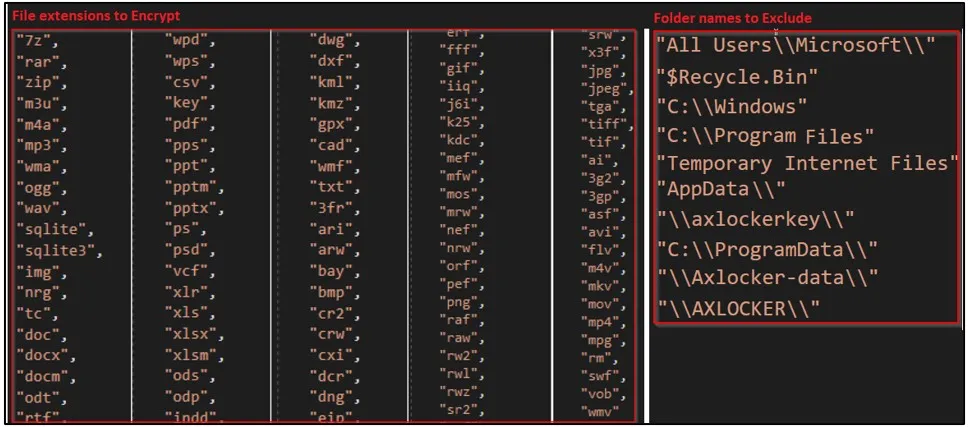
    When executed, the ransomware will target certain file extensions and exclude specific folders, as shown in the image below.

    Targeted files (left) and excluded directories (right)
    Targeted files (left) and excluded directories (right) (Cyble)

    When encrypting a file, AXLocker uses the AES algorithm, but it does not append a filename extension on the encrypted files, so they appear with their normal names.

    Next, AXLocker sends a victim ID, system details, data stored in browsers, and Discord tokens to the threat actors’ Discord channel using a webhook URL.

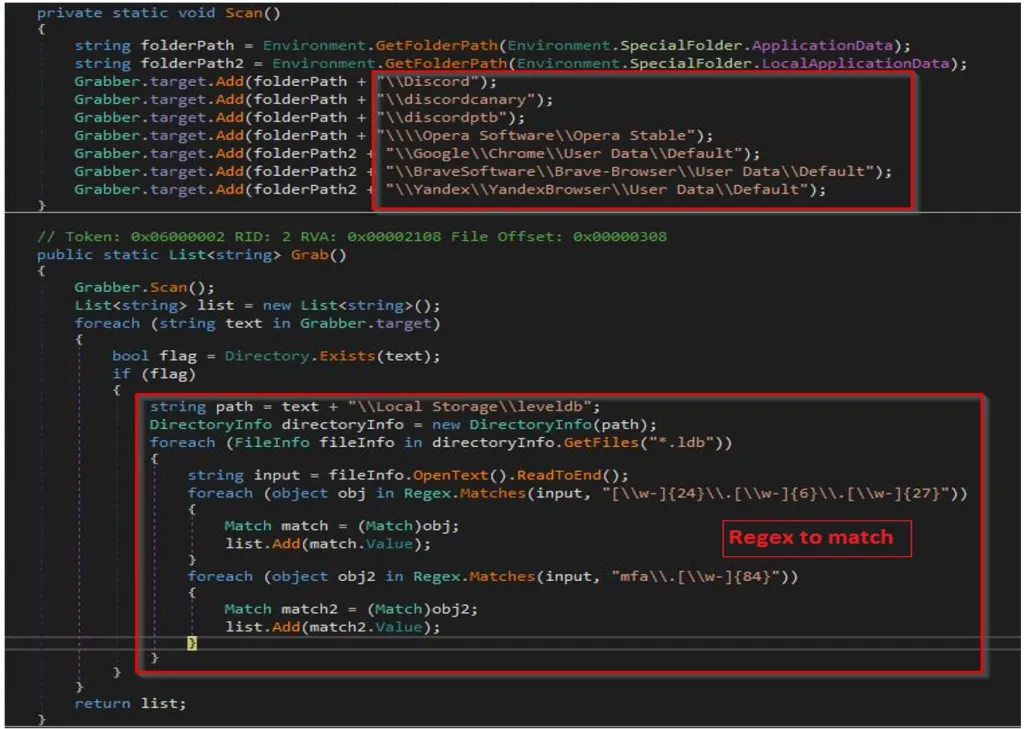
    To steal the Discord token, AxLocker will scan the following directories for and extract tokens using regular expressions:

    • Discord\Local Storage\leveldb
    • discordcanary\Local Storage\leveldb
    • discordptb\leveldb
    • Opera Software\Opera Stable\Local Storage\leveldb
    • Google\Chrome\User Data\\Default\Local Storage\leveldb
    • BraveSoftware\Brave-Browser\User Data\Default\Local Storage\leveldb
    • Yandex\YandexBrowser\User Data\Default\Local Storage\leveldb
    AXLocker's grab function
    AXLocker’s grab function (Cyble)

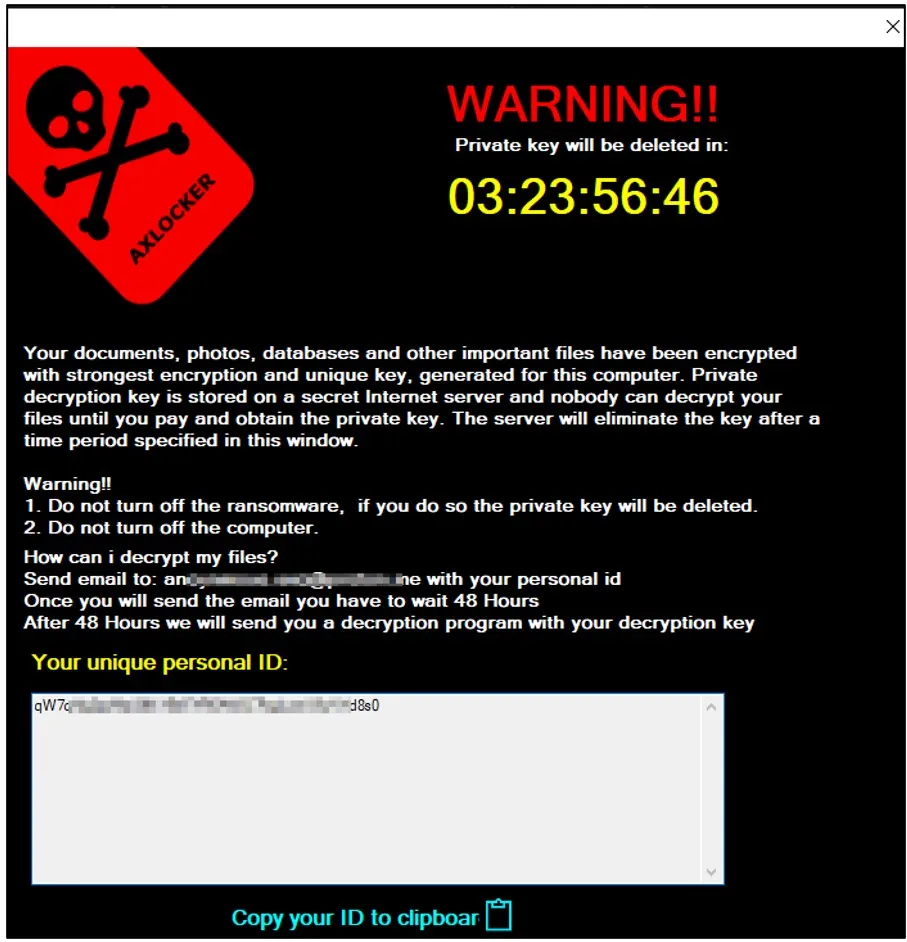
    Eventually, victims are served a pop-up window containing the ransom note, informing them that their data was encrypted and how they contact the threat actor to purchase a decryptor.

    Victims are given 48 hours to contact the attackers with their victim ID, but the ransom amount isn’t mentioned in the note.

    AXLocker ransom note
    AXLocker ransom note (Cyble)

    While this ransomware clearly targets consumers rather than the enterprise, it could still pose a significant threat to large communities.

    Therefore, if you find that AxLocker encrypted your computer, you should immediately change your Discord password, as it will invalidate the token stolen by the ransomware.

    While this may not help recover your files, it will prevent further compromise of your accounts, data, and the communities you are involved in.

    Credits: bleepingcomputer.com

  • Worok hackers hide new malware in PNGs using steganography

    Worok hackers hide new malware in PNGs using steganography

    A threat group tracked as ‘Worok’ hides malware within PNG images to infect victims’ machines with information-stealing malware without raising alarms.

    This has been confirmed by researchers at Avast, who built upon the findings of ESET, the first to spot and report on Worok’s activity in early September 2022.

    ESET warned that Worok targeted high-profile victims, including government entities in the Middle East, Southeast Asia, and South Africa, but their visibility into the group’s attack chain was limited. 

    Avast’s report is based on additional artifacts the company captured from Worok attacks, confirming ESET’s assumptions about the nature of the PNG files and adding new information on the type of malware payloads and the data exfiltration method.

    Hiding malware in PNG files

    While the method used to breach networks remains unknown, Avast believes Worok likely uses DLL sideloading to execute the CLRLoader malware loader into memory.

    This is based on evidence from compromised machines, where Avast’s researchers found four DLLs containing the CLRLoader code.

    Next, the CLRLoader loads the second-stage DLL (PNGLoader), which extracts bytes embedded in PNG files and uses them to assemble two executables.

    Worok's complete infection chain
    Worok’s complete infection chain
    Source: Avast

    Hiding payload in PNGs

    Steganography is concealing code inside image files that appear normal when opened in an image viewer.

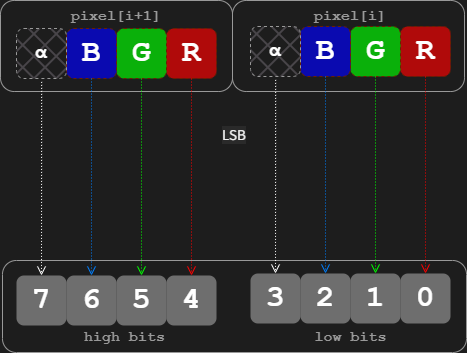
    In the case of Worok, Avast says the threat actors used a technique called “least significant bit (LSB) encoding,” which embeds small chunks of the malicious code in the least important bits of the image’s pixels.

    LSB encoding on image files
    LSB on image pixels
    Source: Avast

    The first payload extracted from those bits by PNGLoader is a PowerShell script that neither ESET nor Avast could retrieve.

    The second payload hiding in the PNG files is a custom .NET C# info-stealer (DropBoxControl) that abuses the DropBox file hosting service for C2 communication, file exfiltration, and more.

    The PNG image containing the second payload is the following:

    A PNG image file containing the info-stealer
    Source: Avast​​​​

    DropBox abuse

    The ‘DropBoxControl’ malware uses an actor-controlled DropBox account to receive data and commands or upload files from the compromised machine.

    The commands are stored in encrypted files on the threat actor’s DropBox repository that the malware accesses periodically to retrieve pending actions.​

    Form of DropBox files
    Form of DropBox files, TaskType is command
    Source: Avast

    The supported commands are the following:

    • Run “cmd /c” with the given parameters
    • Launch an executable with given parameters
    • Download data from DropBox to the device
    • Upload data from the device to DropBox
    • Delete data on the victim’s system
    • Rename data on the victim’s system
    • Exfiltrate file info from a defined directory
    • Set a new directory for the backdoor
    • Exfiltrate system information
    • Update the backdoor’s configuration

    These functions indicate that Worok is a cyberespionage group interested in stealthy data exfiltration, lateral movement, and spying on the infected device.

    Avast comments that the tools sampled from Worok attacks aren’t circulating in the wild, so they’re likely used exclusively by the threat group.

    Credits: bleepingcomputer.com

  • Massive attack against 1.6 million WordPress sites underway

    Massive attack against 1.6 million WordPress sites underway

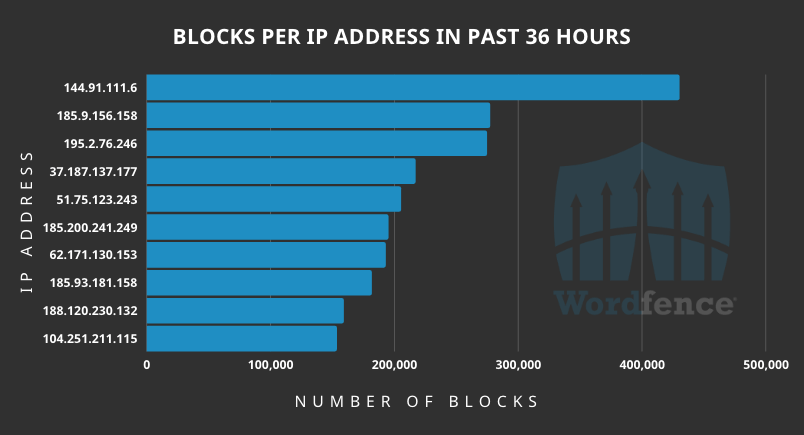
    Wordfence analysts report having detected a massive wave of attacks in the last couple of days, originating from 16,000 IPs and targeting over 1.6 million WordPress sites.

    The threat actors target four WordPress plugins and fifteen Epsilon Framework themes, one of which has no available patch.

    Some of the targeted plugins were patched all the way back in 2018, while others had their vulnerabilities addressed as recently as this week.

    IP addresses launching the attacks

    IP addresses launching the attacks
    Source: Wordfence

    The affected plugins and their versions are:

    • PublishPress Capabilities
    • Kiwi Social Plugin
    • Pinterest Automatic
    • WordPress Automatic

    The targeted Epsilon Framework themes are:

    • Shapely
    • NewsMag
    • Activello
    • Illdy
    • Allegiant
    • Newspaper X
    • Pixova Lite
    • Brilliance
    • MedZone Lite
    • Regina Lite
    • Transcend
    • Affluent
    • Bonkers
    • Antreas
    • NatureMag Lite – No patch available
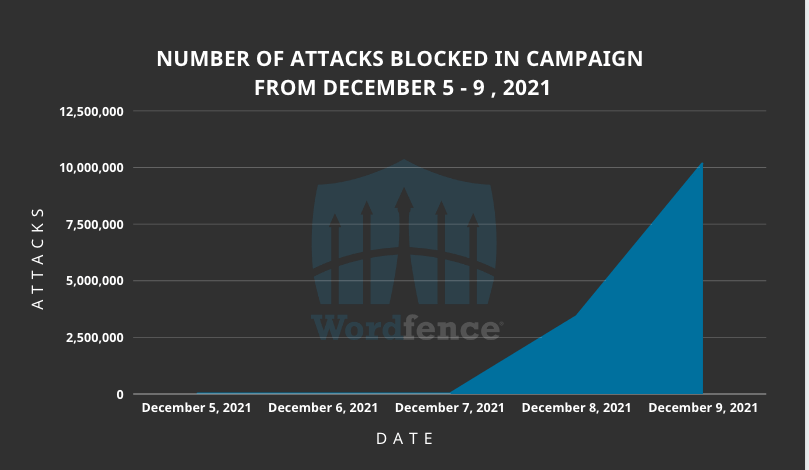
    Attack numbers spiking in the last couple of days
    Attack numbers spiking in the last couple of days
    Source: Wordfence

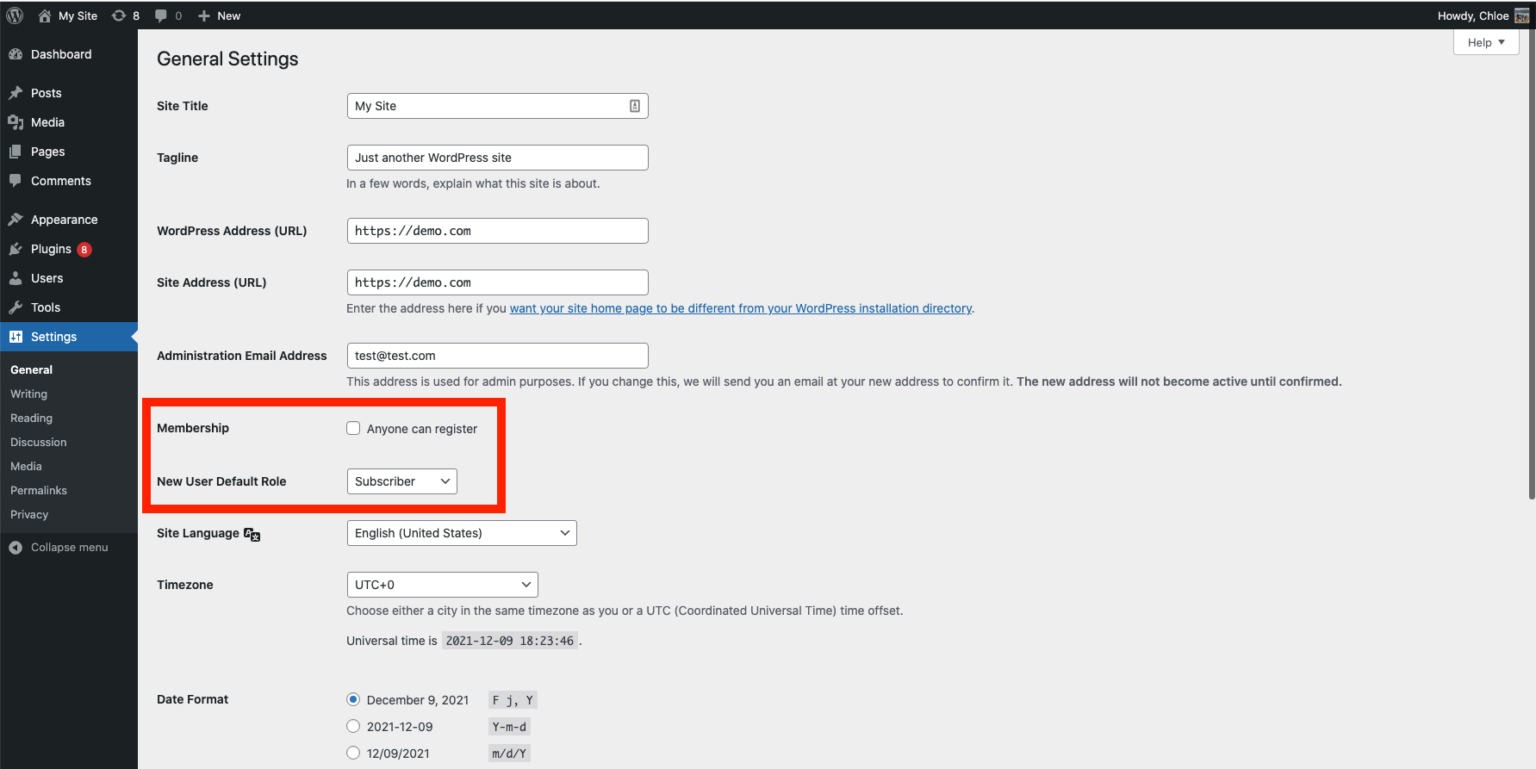
    “In most cases, the attackers are updating the users_can_register option to enabled and setting the default_role option to administrator,” Wordfence explains.

    “This makes it possible for attackers to register on any site as an administrator effectively taking over the site.”

    Also Read: HACKERS DEPLOY LINUX MALWARE, WEB SKIMMER ON E-COMMERCE SERVERS

    Check, update, clean WordPress sites

    To check if your site has already been compromised, you can review all user accounts and look for any rogue additions that should be removed immediately.

    Next, review the site’s settings at “http://examplesite[.]com/wp-admin/options-general.php” and pay attention to the Membership and the new user default role setting.

    Checking settings on the wordpress site
    Checking settings on the site
    Source: Wordfence

    It is recommended to update your plugins and themes as soon as possible, even if they’re not in the above list. If you’re using NatureMag Lite, for which there’s no fix, you should uninstall it immediately.

    Note that updating the plugins won’t eliminate the threat if your site has already been compromised. In this case, you are advised to follow the instructions found in detailed clean-up guides first.

    In general, try to keep the number of plugins at your WordPress site to the absolute minimum necessary as this dramatically reduces the chances of being targeted and hacked in the first place.

    Credits: bleepingcomputer.com

  • Security holes discovered in 9 popular routers – is yours on the list?

    Security holes discovered in 9 popular routers – is yours on the list?

    Keeping a close eye on your online accounts is incredibly important with scams, hacks, and breaches as common as they are. Your hardware is at risk as well, which is why we always recommend keeping your devices updated. In fact, one of the most indispensable devices in your home can also be one of the most vulnerable. Cyber Security researchers recently examined a number of popular WiFi routers and found over 200 potential security holes that could put your data at risk.

    Popular WiFi routers have huge security holes

    Editors at the German IT magazine CHIP recently conducted a thorough security test on nine routers from major brands. They teamed up with security experts from IoT Inspector, who provided a security platform for automated IoT firmware checks. What they found might shock you.

    “The test negatively exceeded all expectations for secure small business and home routers,” Florian Lukavsky, CTO of IoT Inspector, said of the results of the test on Thursday. “Not all vulnerabilities are equally critical – but at the time of the test, all devices showed significant security vulnerabilities that could make a hacker’s life much easier.”

    According to IoT Inspector, the test featured routers from Asus, AVM, D-Link, Netgear, Edimax, TP-Link, Synology, and Linksys. Millions of units of each model are currently in circulation around the world. In all, the researchers found 226 vulnerabilities between the nine models.

    Devices from TP-Link had the most vulnerabilities of any device. The company’s Archer AX6000 routers had a whopping 32 security holes. Meanwhile, Synology’s RT-2600ac router came in second place with 30 vulnerabilities. You can see the full list in this document (German).

    Also Read: NINE WIFI ROUTERS USED BY MILLIONS WERE VULNERABLE TO 226 FLAWS

    What are the vulnerabilities?

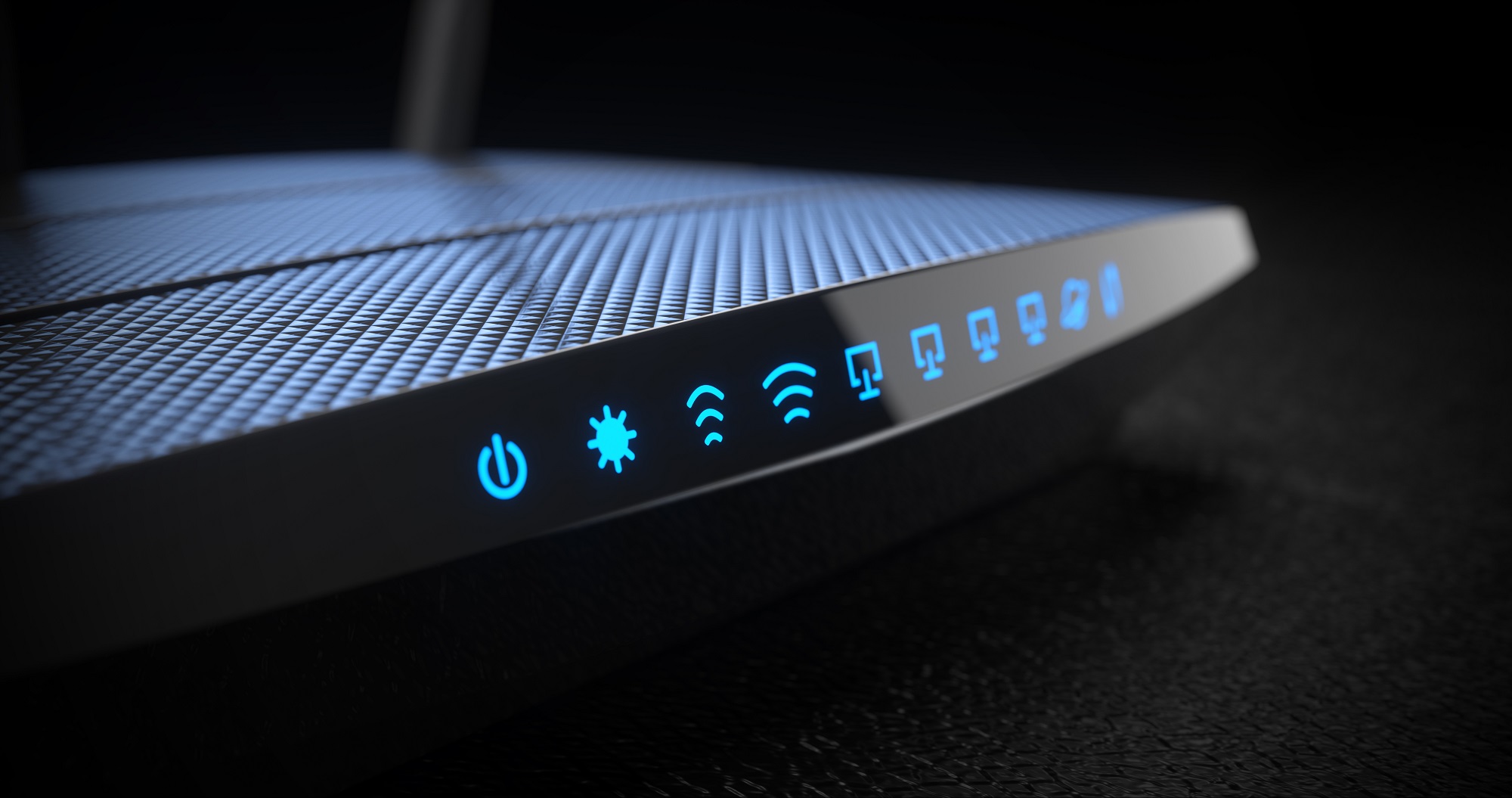
    Wireless internet routers with status lights on.
    Wireless internet router with status lights on. Image source: Oleksandr Delyk/Adobe

    As IoT Inspector explains, many of the routers had the same vulnerabilities. In many cases, it was an outdated operating system. The researchers noted that integrating a new kernel in the firmware is expensive. As a result, none of the manufacturers were up to date.

    The routers also weren’t on the latest software. Most routers update themselves automatically, but only if you enable the feature. Router updates aren’t as frequent as phone or computer updates, but they’re just as important.

    The researchers contacted all of the affected manufacturers before publishing the report. Every manufacturer responded by releasing firmware patches for their routers. Even if your router isn’t on the list, take this opportunity to check for any outstanding firmware updates.

    Additionally, the German government announced that manufacturers will have to take greater responsibility going forward. The new coalition agreement states that “manufacturers are liable for damage negligently caused by IT security vulnerabilities in their products.” So if hackers find and exploit security holes in routers in the future, manufacturers will pay the price.

    What you can do to protect yourself

    Of course, whether or not the manufacturer is responsible, your data is still at risk. IoT Inspector CEO Jan Wendenburg offered the following helpful hint for all router owners:

    Changing passwords on first use and enabling the automatic update function must be standard practice on all IoT devices, whether the device is used at home or in a corporate network. The greatest danger, besides vulnerabilities introduced by manufacturers, is using an IoT device according to the motto ‘plug, play and forget.’

    Update your software, use strong passwords, and keep an eye out for reports such as these.

    Credits: bgr.com

  • These are the worst passwords of 2021, so stop using them ASAP

    These are the worst passwords of 2021, so stop using them ASAP

    Picking a strong password is more important than ever, but it’s also becoming increasingly difficult. Cybercriminals are constantly picking up new tricks, and it is nearly impossible to stay ahead of them. To make matters worse, some of us aren’t even trying. For the past several years, the team behind the password manager NordPass has been putting together lists of the most common passwords around the world. Year after year, the same terrible passwords appear atop the list. And this year is sadly no different. So without further ado, let’s check out the worst passwords of 2021.

    As NordPass explains on its site, the company partnered with independent cybersecurity researchers to evaluate a 4TB database of passwords. Disappointingly, the same password that topped the list last year was once again the most popular password in 2021. You can visit the NordPass website to see all of the entries from 2021, but here are the top 20 most common passwords:

    1. 123456
    2. 123456789
    3. 12345
    4. qwerty
    5. password
    6. 12345678
    7. 111111
    8. 123123
    9. 1234567890
    10. 1234567
    11. qwerty123
    12. 000000
    13. 1q2w3e
    14. aa12345678
    15. abc123
    16. password1
    17. 1234
    18. qwertyuiop
    19. 123321
    20. password123

    A pretty good rule of thumb is that if you can simply slide a finger across your keyboard to enter your password, it’s probably not strong enough. The number of passwords that are just consecutive strings of numbers is rather disheartening. None of these passwords take more than two seconds to crack. If you are using any passwords on this list, or anything similar, consider changing them.

    Jonas Karklys, CEO of NordPass, shared his thoughts on the matter in a statement this week:

    Unfortunately, passwords keep getting weaker, and people still don’t maintain proper password hygiene. It’s important to understand that passwords are the gateway to our digital lives, and with us spending more and more time online, it’s becoming enormously important to take better care of our cybersecurity.

    Also Read: Ransomware gang’s script shows exactly the files they’re after

    How do people pick their passwords?

    In a press release, NordPass shared a few interesting notes about password choices.

    People often use local cultural references in their passwords. Football (American and European) team names often pop up in passwords, such as “steelers” in the US or “liverpool” in the UK. NordPass also found that women tended to use more positive words than men. Women would often use words and phrases like “sunshine” and “iloveyou,” while men frequently used swear words.

    NordPass shared its list of the worst passwords of 2021
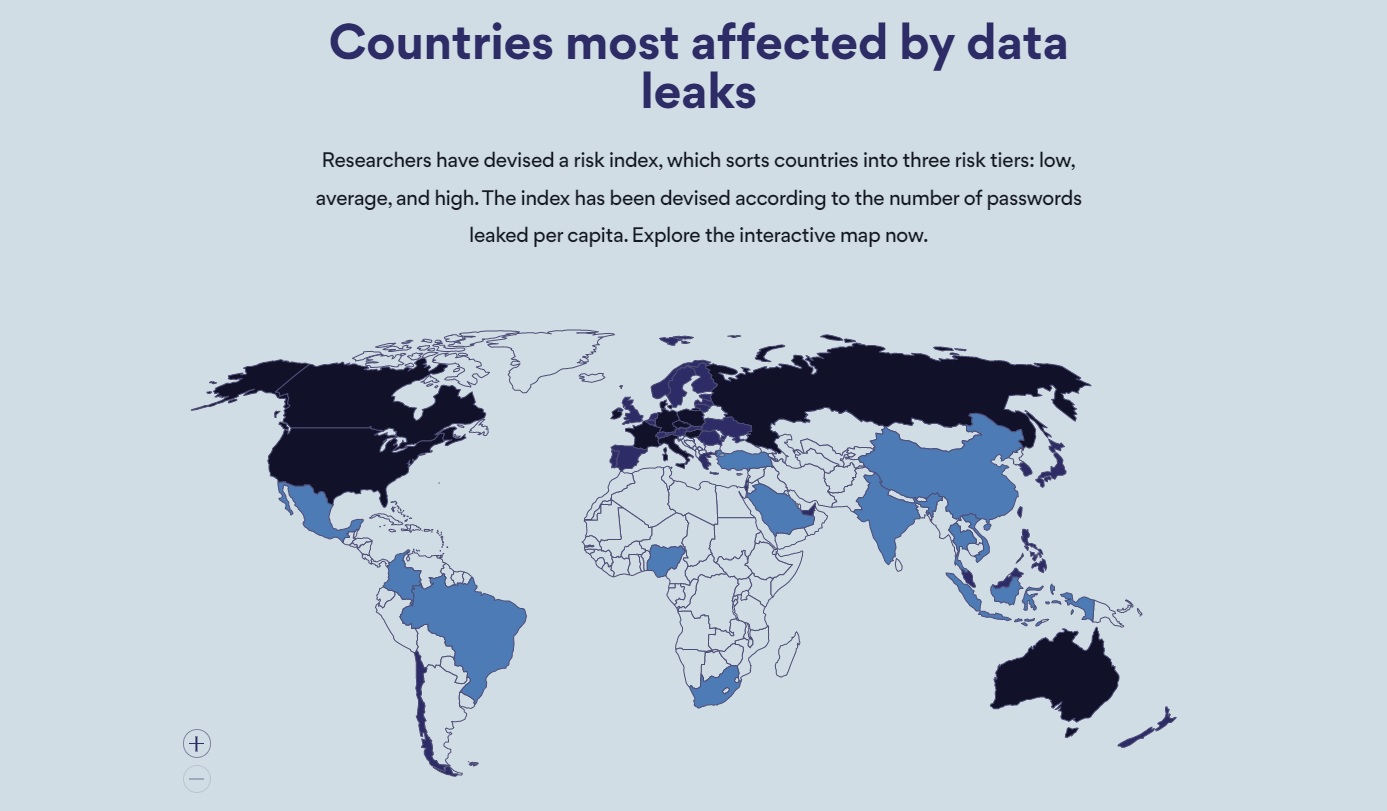
    NordPass ranks the countries at the highest risk of having passwords stolen. Image source: NordPass

    The researchers also devised a risk index based on the number of passwords leaked in each country. Every country is sorted into one of three risk tiers: low, average, and high. Russia came in first with an astounding 19.9 passwords leaked per capita. The US wasn’t far behind at 5.2, putting it in fifth place. Other high-risk countries include France, Italy, Canada, Australia, and Poland.

    How to choose a strong password

    NordPass also shared a few helpful tips for making a strong password that can’t be easily hacked:

    • Use complex passwords: A complex password is one that contains at least 12 characters and a varied combination of upper and lowercase letters, numbers, and symbols. Using a password generator is the easiest and quickest way to create complex passwords.
    • Never reuse passwords: A single password for multiple accounts is a hacker’s delight. If only one of the accounts is compromised, consider all your other accounts jeopardized.
    • Regularly update passwords: Security experts recommend changing passwords every 90 days to keep your accounts secure and bad actors at bay.
    • Check password strength: Regularly assess your password health. Identify weak, reused, or old passwords and fortify your online security with new, complex ones.
    • Use a password manager: Using a password manager to securely store and access your passwords is the simplest and most efficient way to boost your overall online security.

    If you follow these tips, and apply some common sense, you should be able to keep yourself safe online.

    Credits: bgr.com

  • Hackers are stealing 2FA codes with terrifyingly effective voice bots

    Hackers are stealing 2FA codes with terrifyingly effective voice bots

    Every time a massive data breach makes the news, we remind you about the best practices you need to employ to protect your online properties. You should never use weak passwords and recycle them. Instead, pick a password manager that lets you generate unique passwords for every different service, website, and app. And use two-factor authentication (2FA) or one-time passwords (OTP) whenever you can. That way, when hackers inevitably hack one of your accounts, your other properties are protected. But you should remain vigilant when it comes to defending your online accounts.

    Unique passwords and 2FA/OPT aren’t enough, as hackers have found a clever way to trick you into giving them that unique code they need to break into your account. And you might not even realize that you’ve opened the doors to your Amazon, PayPal, Coinbase, or bank account to attackers who might steal money from you. It’s all possible thanks to a new type of customizable bots that place automated calls with the sole scope of stealing that temporary password.

    How bots hack your 2FA codes

    Even without bots, 2FA protection isn’t foolproof. Some hackers might try social engineer attacks to convince you to give up that temporary code or password. But not all of them might be that convincing.

    On the other hand, the bot is a lot more sophisticated and will make you believe that you’re talking to the automated security system belonging to the service that hackers want to penetrate. Motherboard demonstrated the attack with a simple example, an incoming call supposedly coming from PayPal’s fraud prevention system.

    An automated voice tells the PayPal account holder that someone tried to spend a particular sum of money. PayPal needs to verify the account holder’s identity to block the transfer, and they’ll ask for the 2FA/OTP.

    ‘In order to secure your account, please enter the code we have sent your mobile device now,’ the voice said. PayPal sometimes texts users a code in order to protect their account. After entering a string of six digits, the voice said, ‘Thank you, your account has been secured and this request has been blocked.’

    The bot then proceeded to inform the user there’s no reason to worry about:

    ‘Don’t worry if any payment has been charged to your account: we will refund it within 24 to 48 hours. Your reference ID is 1549926. You may now hang up,’ the voice said.

    What actually happens

    Hackers who obtained someone’s personal data — such as their real name, email address, and phone number — might use it to determine whether they have a PayPal account with that address. They can apply the same procedure to any sort of online account. Once they find a match, they can feed the victim’s phone number to a bot that’s tailored for that service.

    Motherboard explains that these bots can cost a few hundreds of dollars per month and target specific services like Amazon and PayPal. Others can target specific banks like Bank of America and Chase. And some of them let you customize the experience to any type of account.

    The bot sounds just like one of the bots you’re might be talking to during regular customer service calls. They’ll invite you to press certain keys and then to input your 2FA/OTP code. But as soon as you do, the code reaches the hacker who initiated the attack.

    Also Read: ROBINHOOD CUSTOMERS WORRIED ABOUT THE DATA HACK: AN IDENTITY THEFT PROTECTION SERVICE CAN HELP

    The reason you get a code via text message on your phone is that the hacker has tried to log into your account, fully knowing they won’t be able to get into it. The bot makes it sound that it’s a service like PayPal that’s generating the unique 2FA/OTP code. And you’ll have no way of knowing it’s a hacker targeting you. Especially as you rush to deal with the threat.

    Once inside your account, the hackers can steal money or cryptocurrency. The video below shows one such conversation with a bot.

    https://youtu.be/Age9FQOwljc

    What you can do to protect your 2FA codes

    If you’re worried about 2FA/OTP bots attacks, you should make sure you understand how they work, and Motherboard’s coverage is a great place to start. You’ll want to inform your friends and family about the increased usage of this sort of hack.

    Next time you receive a call inviting you to input 2FA codes, you should hang up. Never send those codes to anyone. Instead, log into those services to monitor your activity. And call customer support. You might want to change the email associated with that account to prevent these attacks from happening. Once hackers know what email you use for PayPal or Bank of America, they might still target you with similarly sophisticated attacks.

    Credits: bgr.com

  • Wireless key-logger hidden inside USB-C to Lightning cable

    Wireless key-logger hidden inside USB-C to Lightning cable

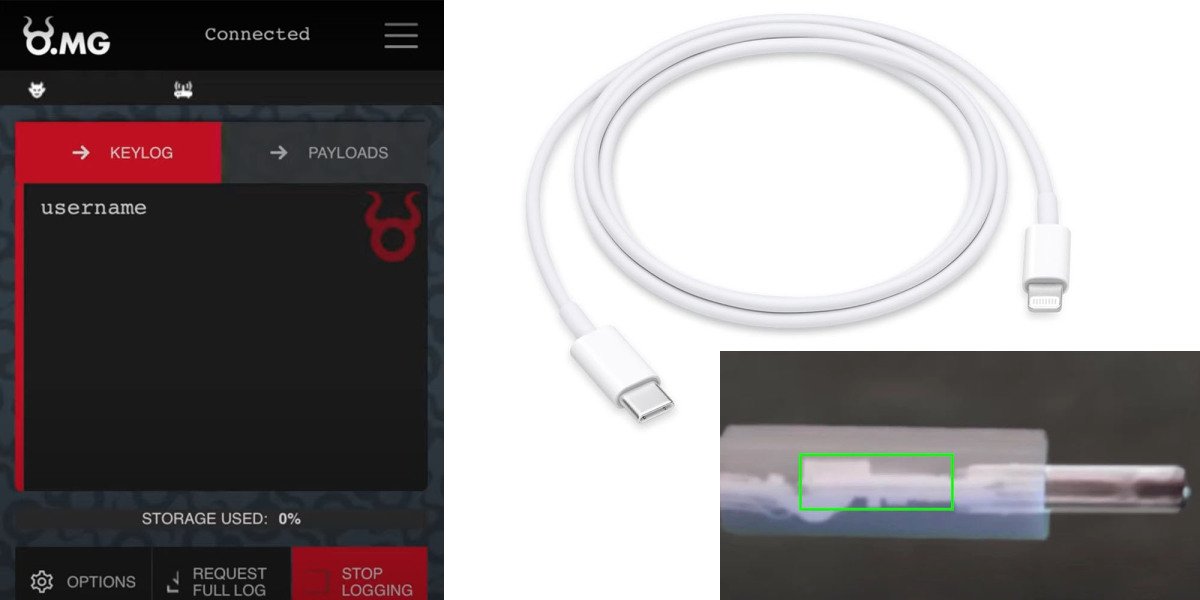
    A USB-C to Lightning cable with a hidden wireless key-logger can enable an attacker to capture everything you type from a distance of up to a mile.

    Any tech-literate person knows you should never plug a USB key into any of your devices unless you trust the person giving it to you, but fewer know that the same applies to USB cables …

    We first saw an example of a malware USB-A cable back in 2019 when a security researcher known as MG demonstrated it to Motherboard. He later made the cable available for sale to penetration testers, and has now created a USB-C version.

    MG told Motherboard that he did so in part because people claimed it couldn’t be done.

    “There were people who said that Type C cables were safe from this type of implant because there isn’t enough space. So, clearly, I had to prove that wrong,” MG told Motherboard in an online chat.

    The OMG Cables, as they’re called, work by creating a Wi-Fi hotspot itself that a hacker can connect to from their own device. From here, an interface in an ordinary web browser lets the hacker start recording keystrokes. The malicious implant itself takes up around half the length of the plastic shell, MG said […]

    “We tested this out in downtown Oakland and were able to trigger payloads at over 1 mile,” he added.

    The site was given examples to test, and were able to confirm that they performed as described.

    | You can also read: Protecting Your Devices

    These latest cables have even greater capabilities.

    MG said that the new cables now have geofencing features, where a user can trigger or block the device’s payloads based on the physical location of the cable.

    “It pairs well with the self-destruct feature if an OMG Cable leaves the scope of your engagement and you do not want your payloads leaking or being accidentally run against random computers,” he said.

    It’s not just key-logging you need worry about: Security researchers last year used a modified USB-C cable to take over the T2 security chip in modern Macs. All that is needed to takeover the machine is for the cable to be plugged in.

    Credit: 9TO5MAC


  • Ransomware attacks are closing schools, delaying chemotherapy and derailing everyday life

    Ransomware attacks are closing schools, delaying chemotherapy and derailing everyday life

    After years of warnings, the impact of ransomware finally hits home for regular people.

    SAN FRANCISCO — It can feel abstract: A group of organized but faceless criminals hijacking corporate computer systems and demanding millions of dollars in exchange for their safe return. But the impact of these ransomware attacks is increasingly, unavoidably, real for everyday people.

    These crimes have resulted in missed chemotherapy appointments and delayed ambulances, lost school days, and transportation problems. A ransomware attack on Colonial Pipeline in May led to gas shortages and even dangerous situations caused by panic buying. This past week, hackers compromised the JBS meat processing company, leading to worries about meat shortages or other key food providers being at risk. Last fall, the Baltimore County Public Schools system was hit with ransomware and forced to halt classes for two days, which were being held virtually.

    As recently as Wednesday, ransomware attacks were causing problems across the country. In Martha’s Vineyard, the ferry service transporting people to and from the Massachusetts island said it had been hit by a ransomware attack that disrupted its ticketing and reservation process. Ferries continued operating all week, but the ticketing system was still affected, causing delays, on Friday.

    The recent spate of high-profile ransomware incidents is exactly what cybersecurity professionals have been warning about for years. But it’s partially the impact on everyday people — far from the executive suites, cybersecurity companies, or government agencies that regularly fret about the criminal enterprise — that has made the risk more visible. The ripple effects of ransomware can result in everything from mild inconvenience to people losing their lives, and it’s only increased in frequency during the pandemic.

    Ransomware attacks could reach ‘pandemic’ proportions. What to know after the pipeline hack.

    “It’s not only that it’s getting worse, but it’s the worst possible time for it to happen,” said Robert Lee, chief executive of Dragos, an industrial cybersecurity firm. He says on average, there are likely 20 to 30 big ransomware cases happening behind the scenes in addition to the ones making headlines.

    Ransomware attacks are not new. The money at stake has changed drastically, however, inflating from thousands to millions of dollars, and the targets are more sophisticated as well. The increasing number of companies connecting their systems and adding more remote access points, along with things like the widespread use of bitcoin, have widened the pool of targets. Cybercriminals once focused on small companies and individuals but have made headlines this year for attacks on higher-profile victims.

    “Now you’ve got ransomware affecting whole corporate networks, interrupting critical national function, causing disruption in people’s lives. It’s really become a national security, public health and safety threat,” said Michael Daniel, president and CEO of the nonprofit group Cyber Threat Alliance.

    The ransomware industry has grown but the underlying techniques for gaining access have largely stayed the same. Hackers commonly access companies’ systems through “phishing” attacks — emails sent to try to trick employees into giving up passwords or access. Once inside a company’s system, ransomware outfits will find critical information and lock it down, then contact a company to demand a ransom for it to be released.

    These criminals generally work in loosely defined groups, sharing tips and resources that make it possible for individual hackers to easily extort multiple targets. Companies occasionally have backup copies of their systems that they can restore rather than pay a ransom. But that can result in delays, and sometimes hackers make copies of the information they access and threaten to leak private information online if they are not paid. A big data leak could be a huge issue for consumers, not just the companies.

    “There’s this awful downward spiral of societal harm that happens from ransomware,” said Megan Stifel, co-chair of the ransomware task force and an executive director at the Global Cyber Alliance.

    The Colonial Pipeline attack was one of the many worst-case scenarios experts have been warning about, and planning for, for years. A ransomware attack last month caused the company to shut down its pipeline connecting Texas to New Jersey.

    Colonial hack exposed government’s light-touch oversight of pipeline cybersecurity

    Panicked that they wouldn’t be able to get enough fuel, drivers swarmed gas stations, resulting in long lines and barren gas pumps in parts of the U.S. Drivers hoarded fuel as stations ran out of their supply, exacerbating the issue. The attack sparked a real-world fire in a Florida town, according to local news reports, when a Hummer burst into flames after the driver filled up four gas containers. The panic buying even prompted the U.S. Consumer Product Safety Commission to issue a long tweet thread about gas safety, including a message that quickly went viral: “Do not fill plastic bags with gasoline.”

    People’s safety has been even more directly threatened by attacks on health care systems. Hospitals have been particularly hard hit, as far back as 2016 when the Hollywood Presbyterian Medical hospital paid $17,000 in bitcoin to a ransomware hacker. Last November, the University of Vermont Medical Center was hit by ransomware and it took nearly a month for it to regain access to its medical records. Chemotherapy patients had their treatments delayed, and were sent to other health centers where some had to recreate their medical history.

    Joshua Corman, the chief strategist for health care and covid on the government’s Cybersecurity and Infrastructure Security Agency COVID Task Force, has been studying the potential impact of health-care attacks on mortality rates. For example, if a hospital has to close suddenly, ambulances might take longer to reach people in distress.

    “Minutes can be the difference between life and death for heart attacks, and hour or two can be the difference for a stroke,” said Corman.

    Lee, the head of Dragos, recently worked with a power company that got hit with a ransomware attack but was able to maintain operations. However, attacks like that could easily result in localized power shortages, he says. Attacks on pharmaceutical companies, or any of the manufacturers in their pipeline, could delay critical medicine like insulin or even vaccines. The increased targeting of industries with the most potential for disruption may be the criminals’ business decision.

    “It feels like these groups realize industrial companies are more ready to pay out and more quick to pay out, because if you impact industrial operations you have to get up and going for safety and community,” said Lee.

    Beyond the physical inconveniences, ransomware attacks can also hurt public trust in technology and systems, and cause people to worry they’ll be a victim or to panic-buy products they think will see a price hike or be in short supply, according to Stifel.

    The Biden administration seeks to rally allies and the private sector against the ransomware threat

    Panic after attacks is part of the problem. This past week’s attack on JBS, one of the largest meat-processing companies in the world, resulted in temporary factory shutdowns. While there were not yet any confirmed meat shortages in the U.S., worried meat suppliers still warned consumers not to panic buy beef, which could cause otherwise still stable prices to go up.

    From higher gas prices to canceled surgeries, real-world financial and consumer safety implications of these hacks have spurred the federal government to crack down on ransomware. It’s investigating the causes, working on guidelines, and urging corporate America to take cybersecurity protections seriously.

    “We’ve been warning about this overtly for more than eight years and a lot more quietly for longer, but now that its manifested, the silver lining is that we’re not starting ice cold,” said CISA’s Corman.

    Credit: Rachel Lerman (The Washington Post)