LastPass maintains that passwords remain safely encrypted.
Password manager LastPass announced Wednesday it had suffered its second data breach in three months. CEO Karim Toubba said the company recently detected unusual activity within a third-party cloud storage service that is shared by LastPass and affiliate GoTo. He said an investigation was immediately launched into the incident by security firm Mandiant and that law enforcement had been alerted.
“We have determined that an unauthorized party, using information obtained in the August 2022 incident, was able to gain access to certain elements of our customers’ information. Our customers’ passwords remain safely encrypted due to LastPass’s Zero Knowledge architecture,” Toubba said.
LastPass is working to identify what specific information has been accessed and the scope of the incident.
Products and services remain fully functional, and LastPass said it continues to deploy enhanced security measures and monitoring capabilities across its infrastructure. Toubba said further updates would be provided as LastPass learns more details.
In August, LastPass said an unauthorized party had gained access to portions of the LastPass development environment through a single compromised developer account and took portions of source code and some proprietary LastPass technical information.
Following an investigation, Toubba said in September that the threat actor’s activity had been limited to a four-day period and confirmed that there is no evidence this incident involved any access to customer data or encrypted password vaults. “We recognize that security incidents of any sort are unsettling but want to assure you that your personal data and passwords are safe in our care,” he said then.
Picking a strong password is more important than ever, but it’s also becoming increasingly difficult. Cybercriminals are constantly picking up new tricks, and it is nearly impossible to stay ahead of them. To make matters worse, some of us aren’t even trying. For the past several years, the team behind the password manager NordPass has been putting together lists of the most common passwords around the world. Year after year, the same terrible passwords appear atop the list. And this year is sadly no different. So without further ado, let’s check out the worst passwords of 2021.
As NordPass explains on its site, the company partnered with independent cybersecurity researchers to evaluate a 4TB database of passwords. Disappointingly, the same password that topped the list last year was once again the most popular password in 2021. You can visit the NordPass website to see all of the entries from 2021, but here are the top 20 most common passwords:
123456
123456789
12345
qwerty
password
12345678
111111
123123
1234567890
1234567
qwerty123
000000
1q2w3e
aa12345678
abc123
password1
1234
qwertyuiop
123321
password123
A pretty good rule of thumb is that if you can simply slide a finger across your keyboard to enter your password, it’s probably not strong enough. The number of passwords that are just consecutive strings of numbers is rather disheartening. None of these passwords take more than two seconds to crack. If you are using any passwords on this list, or anything similar, consider changing them.
Jonas Karklys, CEO of NordPass, shared his thoughts on the matter in a statement this week:
Unfortunately, passwords keep getting weaker, and people still don’t maintain proper password hygiene. It’s important to understand that passwords are the gateway to our digital lives, and with us spending more and more time online, it’s becoming enormously important to take better care of our cybersecurity.
In a press release, NordPass shared a few interesting notes about password choices.
People often use local cultural references in their passwords. Football (American and European) team names often pop up in passwords, such as “steelers” in the US or “liverpool” in the UK. NordPass also found that women tended to use more positive words than men. Women would often use words and phrases like “sunshine” and “iloveyou,” while men frequently used swear words.
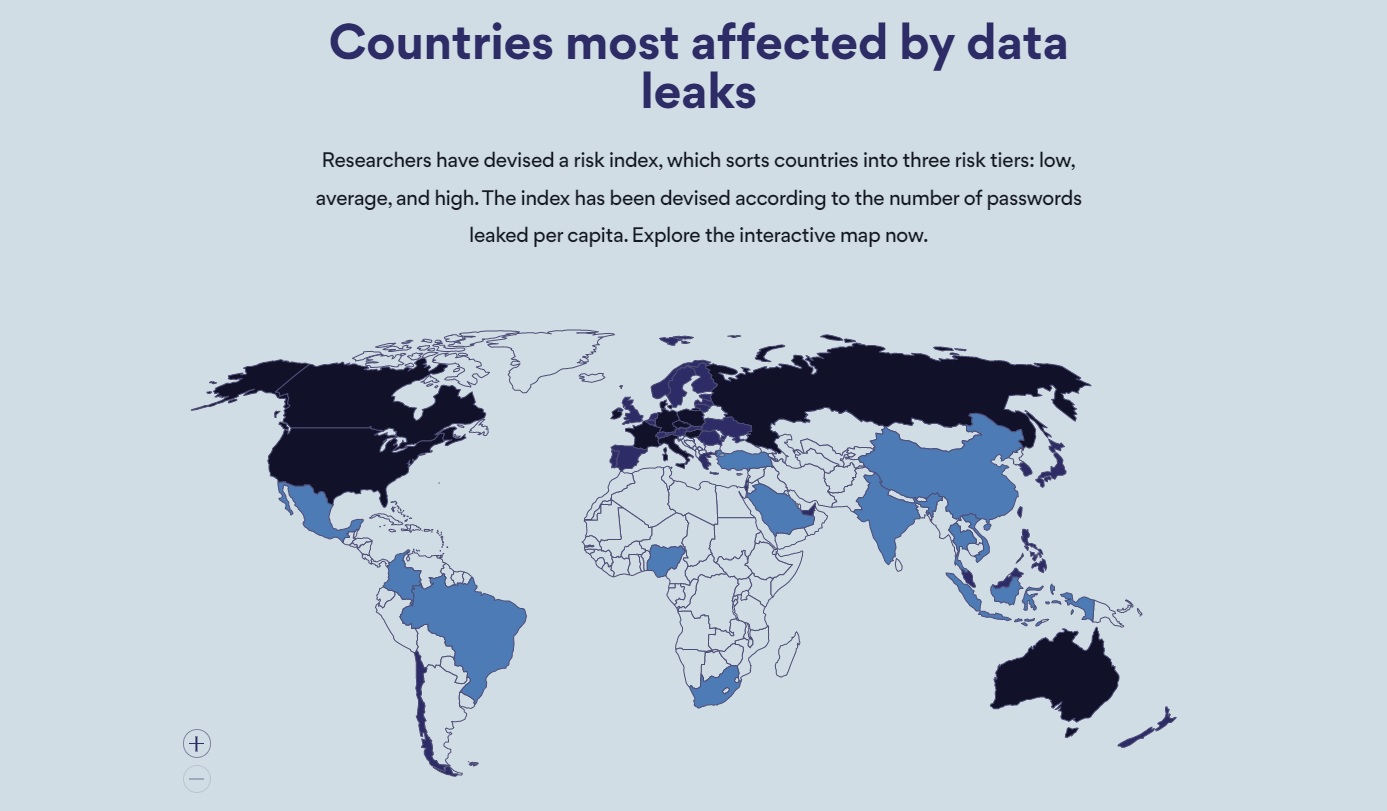
NordPass ranks the countries at the highest risk of having passwords stolen. Image source: NordPass
The researchers also devised a risk index based on the number of passwords leaked in each country. Every country is sorted into one of three risk tiers: low, average, and high. Russia came in first with an astounding 19.9 passwords leaked per capita. The US wasn’t far behind at 5.2, putting it in fifth place. Other high-risk countries include France, Italy, Canada, Australia, and Poland.
How to choose a strong password
NordPass also shared a few helpful tips for making a strong password that can’t be easily hacked:
Use complex passwords: A complex password is one that contains at least 12 characters and a varied combination of upper and lowercase letters, numbers, and symbols. Using a password generator is the easiest and quickest way to create complex passwords.
Never reuse passwords: A single password for multiple accounts is a hacker’s delight. If only one of the accounts is compromised, consider all your other accounts jeopardized.
Regularly update passwords: Security experts recommend changing passwords every 90 days to keep your accounts secure and bad actors at bay.
Check password strength: Regularly assess your password health. Identify weak, reused, or old passwords and fortify your online security with new, complex ones.
Use a password manager: Using a password manager to securely store and access your passwords is the simplest and most efficient way to boost your overall online security.
If you follow these tips, and apply some common sense, you should be able to keep yourself safe online.