Blog

  • These are the worst passwords of 2021, so stop using them ASAP

    These are the worst passwords of 2021, so stop using them ASAP

    Picking a strong password is more important than ever, but it’s also becoming increasingly difficult. Cybercriminals are constantly picking up new tricks, and it is nearly impossible to stay ahead of them. To make matters worse, some of us aren’t even trying. For the past several years, the team behind the password manager NordPass has been putting together lists of the most common passwords around the world. Year after year, the same terrible passwords appear atop the list. And this year is sadly no different. So without further ado, let’s check out the worst passwords of 2021.

    As NordPass explains on its site, the company partnered with independent cybersecurity researchers to evaluate a 4TB database of passwords. Disappointingly, the same password that topped the list last year was once again the most popular password in 2021. You can visit the NordPass website to see all of the entries from 2021, but here are the top 20 most common passwords:

    1. 123456
    2. 123456789
    3. 12345
    4. qwerty
    5. password
    6. 12345678
    7. 111111
    8. 123123
    9. 1234567890
    10. 1234567
    11. qwerty123
    12. 000000
    13. 1q2w3e
    14. aa12345678
    15. abc123
    16. password1
    17. 1234
    18. qwertyuiop
    19. 123321
    20. password123

    A pretty good rule of thumb is that if you can simply slide a finger across your keyboard to enter your password, it’s probably not strong enough. The number of passwords that are just consecutive strings of numbers is rather disheartening. None of these passwords take more than two seconds to crack. If you are using any passwords on this list, or anything similar, consider changing them.

    Jonas Karklys, CEO of NordPass, shared his thoughts on the matter in a statement this week:

    Unfortunately, passwords keep getting weaker, and people still don’t maintain proper password hygiene. It’s important to understand that passwords are the gateway to our digital lives, and with us spending more and more time online, it’s becoming enormously important to take better care of our cybersecurity.

    Also Read: Ransomware gang’s script shows exactly the files they’re after

    How do people pick their passwords?

    In a press release, NordPass shared a few interesting notes about password choices.

    People often use local cultural references in their passwords. Football (American and European) team names often pop up in passwords, such as “steelers” in the US or “liverpool” in the UK. NordPass also found that women tended to use more positive words than men. Women would often use words and phrases like “sunshine” and “iloveyou,” while men frequently used swear words.

    NordPass shared its list of the worst passwords of 2021
    NordPass ranks the countries at the highest risk of having passwords stolen. Image source: NordPass

    The researchers also devised a risk index based on the number of passwords leaked in each country. Every country is sorted into one of three risk tiers: low, average, and high. Russia came in first with an astounding 19.9 passwords leaked per capita. The US wasn’t far behind at 5.2, putting it in fifth place. Other high-risk countries include France, Italy, Canada, Australia, and Poland.

    How to choose a strong password

    NordPass also shared a few helpful tips for making a strong password that can’t be easily hacked:

    • Use complex passwords: A complex password is one that contains at least 12 characters and a varied combination of upper and lowercase letters, numbers, and symbols. Using a password generator is the easiest and quickest way to create complex passwords.
    • Never reuse passwords: A single password for multiple accounts is a hacker’s delight. If only one of the accounts is compromised, consider all your other accounts jeopardized.
    • Regularly update passwords: Security experts recommend changing passwords every 90 days to keep your accounts secure and bad actors at bay.
    • Check password strength: Regularly assess your password health. Identify weak, reused, or old passwords and fortify your online security with new, complex ones.
    • Use a password manager: Using a password manager to securely store and access your passwords is the simplest and most efficient way to boost your overall online security.

    If you follow these tips, and apply some common sense, you should be able to keep yourself safe online.

    Credits: bgr.com

  • Hackers deploy Linux malware, web skimmer on e-commerce servers

    Hackers deploy Linux malware, web skimmer on e-commerce servers

    Security researchers discovered that attackers are also deploying a Linux backdoor on compromised e-commerce servers after injecting a credit card skimmer into online shops’ websites.

    The PHP-coded web skimmer (a script designed to steal and exfiltrate customers’ payment and personal info) is added and camouflaged as a .JPG image file in the /app/design/frontend/ folder.

    The attackers use this script to download and inject fake payment forms on checkout pages displayed to customers by the hacked online shop.

    “We found that the attacker started with automated eCommerce attack probes, testing for dozens of weaknesses in common online store platforms,” the Sansec Threat Research Team revealed.

    “After a day and a half, the attacker found a file upload vulnerability in one of the store’s plugins. S/he then uploaded a webshell and modified the server code to intercept customer data.”

    Linux malware undetected by security software

    The Golang-based malware, spotted by Dutch cyber-security company Sansec on the same server, was downloaded and executed on breached servers as a linux_avp executable.

    Once launched, it immediately removes itself from the disk and camouflages itself as a “ps -ef” process that would be used to get a list of currently-running processes.

    Also Read: These 23 fake Android apps are dangerous spyware, so delete them now

    While analyzing the linux_avp backdoor, Sansec found that it waits for commands from a Beijing server hosted on Alibaba’s network.

    They also discovered that the malware would gain persistence by adding a new crontab entry that would redownload the malicious payload from its command-and-control server and reinstall the backdoor if detected and removed or the server restarts.

    Until now, this backdoor remains undetected by anti-malware engines on VirusTotal even though a sample was first uploaded more than one month ago, on October 8th.

    The uploader might be the linux_avp creator since it was submitted one day after researchers at Dutch cyber-security company Sansec spotted it while investigating the e-commerce site breach.

  • PRIVACY REPORT: WHAT ANDROID DOES IN THE BACKGROUND

    PRIVACY REPORT: WHAT ANDROID DOES IN THE BACKGROUND

    We’ve come a long way from the Internet of the 90s and early 00s. Not just in terms of technology, capabilities, and culture, but in the attitude most of us take when accessing the ‘net. In those early days most users had a militant drive to keep any personal or identifying information to themselves beyond the occasional (and often completely fictional) a/s/l, and before eBay and Amazon normalized online shopping it was unheard of to even type in a credit card number. On today’s internet we do all of these things with reckless abandon, and to make matters worse most of us carry around a device which not only holds all of our personal information but also reports everything about us, from our browsing habits to our locations, back to databases to be stored indefinitely.

    It was always known that both popular mobile operating systems for these devices, iOS and Android, “phone home” or report data about us back to various servers. But just how much the operating systems themselves did was largely a matter of speculation, especially for Apple devices which are doing things that only Apple can really know for sure. While Apple keeps their mysteries to themselves and thus can’t be fully trusted, Android is much more open which paradoxically makes it easier for companies (and malicious users) to spy on users but also makes it easier for those users to secure their privacy on their own. Thanks to this recent privacy report on several different flavors of Android (PDF warning) we know a little bit more on specifically what the system apps are doing, what information they’re gathering and where they’re sending it, and exactly which versions of Android are best for those of us who take privacy seriously.

    THE REAL RESEARCH CONFIRMS SUSPICIONS

    The report takes a look at six different “flavors” of Android and what each one is doing behind the scenes. The researchers studied operating systems from Samsung, Xiaomi, Huawei, and Realme which all also produce their own devices, but also looked at two alternative Android-based operating systems — LineageOS and /e/OS — that can be installed on some devices and customized for privacy if the user chooses. /e/OS is built with privacy in mind, while LineageOS is more of a drop-in replacement which doesn’t specifically focus on privacy. It should be no surprise that the four Android versions customized by the device manufacturers report a ton of user data, or that any device with a Google Apps (GApps) package reports a seemingly unending stream of user information back to Google servers, but some of the specific results that the research team found are definitely worth noting.

    First, the paper points out that all of these companies are trivially able to link devices to users. Companies match IMEI numbers and other identifiers of devices to other user data that makes linking these accounts together a simple game of connect-the-dots. Largely the reason for doing this is to target ads, but all of these companies will also share this information indiscriminately with various governmental agencies. They also aren’t perfectly secure, so any black-hat attacker who gets access to this information will have it as well. This shouldn’t be too surprising, but the new information here is that researchers also found this data is shared among companies. For example, Samsung and Google seem to share each other’s data amongst themselves. Swiftkey, a popular keyboard app, also sends information to Microsoft via Google. It’s quite a complex web of data sharing and services from one company to support another’s data gathering efforts. Some of these data gathering efforts also include details such as timestamped app usage and personal contact gathering. While a lot of the information the operating systems are actually gathering is sometimes obfuscated, it’s clear that anything done on any of these devices might as well be recorded as if it was a Twitch stream as there’s evidence to suggest that literally everything could be monitored by someone (or some piece of software), right down to a user’s keystrokes.

    The researchers contrast this rampant data gathering activity with /e/OS, a privacy-oriented version of Android. /e/OS is a fork of LineageOS which is specifically devoted to privacy, includes no Google-related software, and gathers essentially no user data on its own apart from information about available updates and some other necessary information. LineageOS is only marginally better than the Android offerings from the major manufacturers when the GApps package is installed with it, largely because the Google system apps are so pervasive at gathering user data. It is possible to use LineageOS without the GApps package but the researchers did not take this approach and largely focused on /e/OS as the de-Googled version of study.

    Also Read: ROBINHOOD CUSTOMERS WORRIED ABOUT THE DATA HACK: AN IDENTITY THEFT PROTECTION SERVICE CAN HELP

    BEYOND THIS STUDY

    While /e/OS is certainly an excellent choice for privacy-conscious users of smartphones, there are a few others worth mentioning that were not included in the study. Drawing the conclusion from this research that the real privacy violator is GApps (as long as you can avoid the other spyware from Samsung et. al.), it is possible to install LineageOS on a wider array of devices than /e/OS currently supports. Since installing GApps is something that is typically sideloaded after installing LineageOS and is an optional step, this can simply be omitted.

    LineageOS logo

    Additionally, if you absolutely can’t live without Google Maps or Gmail, there is a way of accessing Google services without actually installing them on your device. A software package called MicroG is available which is an open-source replacement for GApps and allows the user to access Google services that otherwise would be available but restricts tracking and gathering of user data by Google in key ways. There is a fork of LineageOS called “LineageOS for MicroG” which includes this package instead of GApps by default, although there have been squabbles between the maintainers of this project and LineageOS over concerns with the way that MicroG accesses the Google services by signature spoofing.

    GrapheneOS Logo

    For those with Google Pixel devices specifically, there are two other privacy options. GrapheneOS is the Cadillac of privacy-focused versions of Android and has a number of improvements to enhance security as well, such as app sandboxing, implementation of secure/verified boot, disabling of peripherals via toggles, and other enhancements. CalyxOS is based on GrapheneOS and is similar but does allow for the use of MicroG and has some less-intense security practices than GrapheneOS. The only downsides with these flavors of Android is that they are built almost exclusively for the Google Pixel and at a minimum requires trust that Google didn’t build a hardware backdoor of some sort into their phones.

    ANDROID ISN’T THE ONLY OPTION

    There are a few other options for improving online privacy when using a smartphone. Linux-only phones such as the Pinephone are available but are not as fully-featured as Android. Some versions of Linux are also available for phones that would otherwise run Android. It’s also probable that an iPhone is a security and privacy improvement over a factory Android device from any major service carrier or device manufacturer, although the fact that their software is closed-source and behind a walled garden makes this extremely difficult to verify. Still, if a user isn’t willing to jump through all of these hoops to install /e/OS, GrapheneOS, or Ubuntu Touch, or if their phone has a locked bootloader making it impossible to flash a new OS (or if their device just isn’t supported), it’s preferable to choose an iPhone only if all other options are exhausted. Of course, the only other option is to not own a smartphone at all, which is arguably the easiest way of improving the privacy concerns with these devices.

    The paper goes into great detail on methodology and also includes information on how they determined what data was being sent for those curious about specifics. It’s also worth noting that they point out that none of this research investigates any specific apps that might be installed on a phone and only looks at the operating system apps. If you install random freemium games, banking apps, or Facebook on your GrapheneOS install, for example, it’s likely to void any and all of your privacy efforts. The paper itself is worth a read though even for those who haven’t considered their online privacy before, even if they did grow up in the 90s.

    Credit: hackaday.com

  • Hackers are stealing 2FA codes with terrifyingly effective voice bots

    Hackers are stealing 2FA codes with terrifyingly effective voice bots

    Every time a massive data breach makes the news, we remind you about the best practices you need to employ to protect your online properties. You should never use weak passwords and recycle them. Instead, pick a password manager that lets you generate unique passwords for every different service, website, and app. And use two-factor authentication (2FA) or one-time passwords (OTP) whenever you can. That way, when hackers inevitably hack one of your accounts, your other properties are protected. But you should remain vigilant when it comes to defending your online accounts.

    Unique passwords and 2FA/OPT aren’t enough, as hackers have found a clever way to trick you into giving them that unique code they need to break into your account. And you might not even realize that you’ve opened the doors to your Amazon, PayPal, Coinbase, or bank account to attackers who might steal money from you. It’s all possible thanks to a new type of customizable bots that place automated calls with the sole scope of stealing that temporary password.

    How bots hack your 2FA codes

    Even without bots, 2FA protection isn’t foolproof. Some hackers might try social engineer attacks to convince you to give up that temporary code or password. But not all of them might be that convincing.

    On the other hand, the bot is a lot more sophisticated and will make you believe that you’re talking to the automated security system belonging to the service that hackers want to penetrate. Motherboard demonstrated the attack with a simple example, an incoming call supposedly coming from PayPal’s fraud prevention system.

    An automated voice tells the PayPal account holder that someone tried to spend a particular sum of money. PayPal needs to verify the account holder’s identity to block the transfer, and they’ll ask for the 2FA/OTP.

    ‘In order to secure your account, please enter the code we have sent your mobile device now,’ the voice said. PayPal sometimes texts users a code in order to protect their account. After entering a string of six digits, the voice said, ‘Thank you, your account has been secured and this request has been blocked.’

    The bot then proceeded to inform the user there’s no reason to worry about:

    ‘Don’t worry if any payment has been charged to your account: we will refund it within 24 to 48 hours. Your reference ID is 1549926. You may now hang up,’ the voice said.

    What actually happens

    Hackers who obtained someone’s personal data — such as their real name, email address, and phone number — might use it to determine whether they have a PayPal account with that address. They can apply the same procedure to any sort of online account. Once they find a match, they can feed the victim’s phone number to a bot that’s tailored for that service.

    Motherboard explains that these bots can cost a few hundreds of dollars per month and target specific services like Amazon and PayPal. Others can target specific banks like Bank of America and Chase. And some of them let you customize the experience to any type of account.

    The bot sounds just like one of the bots you’re might be talking to during regular customer service calls. They’ll invite you to press certain keys and then to input your 2FA/OTP code. But as soon as you do, the code reaches the hacker who initiated the attack.

    Also Read: ROBINHOOD CUSTOMERS WORRIED ABOUT THE DATA HACK: AN IDENTITY THEFT PROTECTION SERVICE CAN HELP

    The reason you get a code via text message on your phone is that the hacker has tried to log into your account, fully knowing they won’t be able to get into it. The bot makes it sound that it’s a service like PayPal that’s generating the unique 2FA/OTP code. And you’ll have no way of knowing it’s a hacker targeting you. Especially as you rush to deal with the threat.

    Once inside your account, the hackers can steal money or cryptocurrency. The video below shows one such conversation with a bot.

    https://youtu.be/Age9FQOwljc

    What you can do to protect your 2FA codes

    If you’re worried about 2FA/OTP bots attacks, you should make sure you understand how they work, and Motherboard’s coverage is a great place to start. You’ll want to inform your friends and family about the increased usage of this sort of hack.

    Next time you receive a call inviting you to input 2FA codes, you should hang up. Never send those codes to anyone. Instead, log into those services to monitor your activity. And call customer support. You might want to change the email associated with that account to prevent these attacks from happening. Once hackers know what email you use for PayPal or Bank of America, they might still target you with similarly sophisticated attacks.

    Credits: bgr.com

  • Robinhood customers worried about the data hack: An identity theft protection service can help

    Robinhood customers worried about the data hack: An identity theft protection service can help

    Robinhood’s latest data hack is a reminder of how we can protect our identity from being stolen.

    On Nov. 8, investment platform Robinhood announced that a data breach revealed the personal information of more than 7 million of its customers. According to a statement made by the company, the security attack did not expose Social Security numbers, bank account numbers or debit card numbers, and no customers experienced “financial loss” from the incident.

    The data breach was largely contained to only customer names and emails. A limited number of customers had additional personal information exposed such as birth date and zip code, and the company says roughly 10 customers had “more extensive account details revealed” (though details were not disclosed).

    If you are a Robinhood user, you can learn more about keeping your account secure by going to the help center on the company’s website. You may want to take an extra step, however, by investing in an extra level of protection for your personal information. Here’s where identity theft services are a good idea.

    How to further protect yourself from identity fraud

    Identity theft can come in all sorts of ways, a stolen Social Security number or seized credit card information, and it can be costly. A 2020 Identity Fraud Study by Javelin Strategy and Research found that identity fraud cost consumers a whopping $16.9 billion in 2019. You may not spot fraud right away but yet the longer it drags on, the more expensive the identity theft can be to resolve.

    Robinhood users who got off the hook this time but want to quickly spot potential fraud in the future may want to consider signing up for an identity theft protection service.

    These services can tell if a fraudster has your info by checking if your personal information is misused or if it appears on the dark web, social media or other databases. If you’re the victim of fraud, many services also offer advice from specialists, as well as insurance that can offset legal fees and other expenses related to restoring your identity.

    The best identity theft protection services

    Select reviewed dozens of identity theft protection and credit monitoring services that safeguard your information and provide insurance. The best services, like IdentityForce®, offer up to $1 million for eligible expenses associated with resolving and restoring your identity.

    In fact, we ranked IdentityForce the ‘best overall’ because its two UltraSecure and UltraSecure+Credit plans both provide standard coverage up to $1 million to help you recover out-of-pocket expenses and lost wages when your identity is compromised. Robinhood customers should take note that with either plan they can also receive alerts for potential fraud on their bank, credit card and investment accounts, as well as the use of their medical ID, Social Security number and address. Find out what other coverage you get, plus pricing details, in our full review of IdentityForce.

    Below, we rank the top identity theft services — in addition to IdentityForce — that can alert you of potential breaches to your personal information. (Read more about our methodology for selecting the best identity theft protection services.)

    It’s important to understand that these services can’t prevent fraud from happening. You’ll need to be proactive and safeguard your personal information to reduce your exposure to identity theft.

    Also Read: THESE 23 FAKE ANDROID APPS ARE DANGEROUS SPYWARE, SO DELETE THEM NOW

    Our methodology

    To determine which identity theft protection services offer the most benefits to consumers, Select analyzed and compared over a dozen services that offer a variety of plans.

    When ranking the best identity theft protection services, we focused on the following features:

    • Cost: Typically, these services bill monthly but some have deals where you can pay annually.
    • Identity theft insurance: We considered whether the services offered identity theft insurance and looked at the amount you’re covered up to. We found that the best services offer up to $1 million for eligible expenses associated with resolving and restoring your identity.
    • Wide variety of identity monitoring: The more platforms the service checks for breaches to your personal information, the better.
    • Credit monitoring: We ranked services that monitor your credit reports higher than those they don’t. The best plans offer triple-bureau monitoring.
    • Family plans: If you can enroll your family members, that’s an added plus.
    • Mobile app: The ability to access services from a smartphone was crucial.

    Keep in mind that identity theft protection services can only alert you of breaches to your personal information, not prevent any fraud.

    Credit: cnbc.com

  • These 23 fake Android apps are dangerous spyware, so delete them now

    These 23 fake Android apps are dangerous spyware, so delete them now

    Danger lurks around every corner online. Whether you’re using a phone, a tablet, or a computer, you always have to keep your guard up to avoid hacks and scams. This is especially true for Android users, as dangerous phishing campaigns appear to be popping up on a weekly basis. The latest is PhoneSpy, and it involves a collection of spyware apps masquerading as helpful tools. If you have any of these malicious apps on your phone, it’s imperative that you delete them immediately.

    Mobile security company Zimperium recently uncovered a targeted spyware campaign it has dubbed PhoneSpy. As the company explains, PhoneSpy disguises itself as a standard mobile app that purports to stream movies, help users learn yoga, or browse photo collections. But in reality, the spyware steals documents, photos, videos, and more from the Android phone.

    PhoneSpy Android spyware campaign

    Here’s what will happen if PhoneSpy manages to infect your device, according to Zimperium:

    Upon infection, the victim’s mobile device will transmit accurate GPS locational data, share photos and communications, contact lists, and downloaded documents with the command and control server. Similar to other mobile spyware we have seen, the data stolen from these devices could be used for personal and corporate blackmail and espionage. The malicious actors could then produce notes on the victim, download any stolen materials, and gather intelligence for other nefarious practices.

    If you want an even more detailed breakdown, here’s what a PhoneSpy app can do to your phone:

    • Complete list of the installed applications
    • Steal credentials using phishing
    • Steal images
    • Monitoring the GPS location
    • Steal SMS messages
    • Steal call logs
    • Record audio in real-time
    • Steal phone contacts
    • Record video in real-time using front & rear cameras
    • Access camera to take photos using front & rear cameras
    • Send SMS to attacker-controlled phone number with attacker-controlled text
    • Exfiltrate device information (IMEI, Brand, device name, Android version)
    • Conceal its presence by hiding the icon from the device’s drawer/menu

    As terrifying as that might sound, there is some relatively good news. Zimperium says that its zLabs mobile threat research team found just 23 Android apps in the PhoneSpy campaign. All of those apps were targeting South Korean citizens specifically, so if you’re anywhere but South Korea, you’re in the clear for now. That said, Zimperium believes thousands of South Korean victims already downloaded the malicious apps. This is why it’s so vital to constantly be on the lookout.

    Credits: bgr.com

  • Security researcher updates OMG Cables to record user keystrokes

    Security researcher updates OMG Cables to record user keystrokes

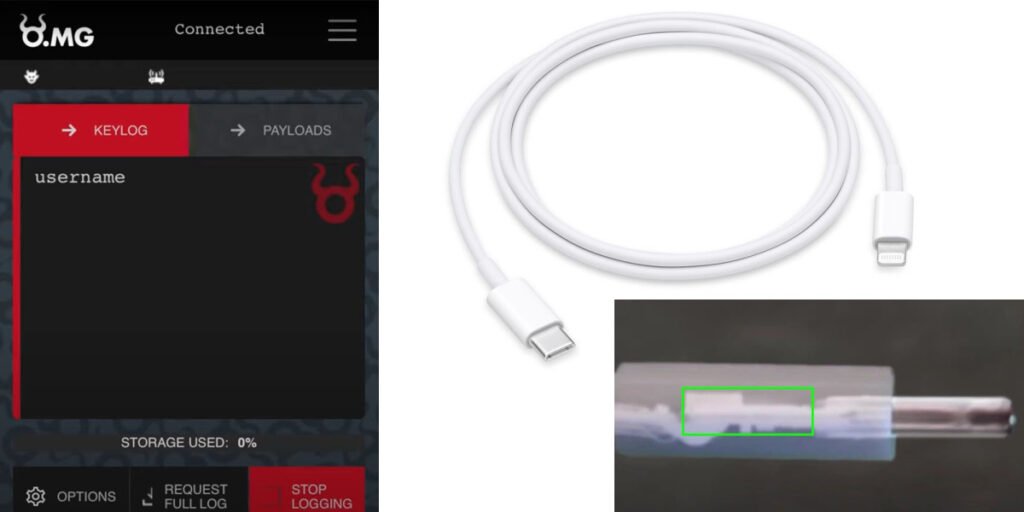
    Security researcher Mark Green, (who goes by MG) has revealed to the Vices team at Motherboard that he and his team have upgraded their version of a hacked Lightning cable in a way that allows a hacker to record keystrokes and then to send the data to a designated site. This would allow the device to be used to steal passwords and other sensitive information.

    A Lightning cable allows for charging a  such as a smartphone using a computer or laptop instead of a charger. Back in 2019, MG demoed a cable that looked like a Lightning cable but had hacking capabilities built into it. Shortly thereafter, MG reportedly partnered with a cybersecurity vendor called Hak5 and began selling the cables. The idea behind the development of the cable and sales of it were meant not just to highlight, but demonstrate how such simple devices can be altered in minor ways that allow real hackers to take advantage of consumers.

    More recently, MG spoke with the team at Motherboard and told them that he has updated the cable to allow it to both record keystrokes and to use an added WiFi chip to broadcast the data it captures to a designated site where hackers could conceivably study the data and use it to their advantage.

    MG also told the team at Motherboard that part of the reason he built the new cable was because other experts in the field had claimed that it could not be done due to size and space limitations—there was not enough room inside the connective housing on Type C Lightning cables. MG claims to have proven such experts wrong by adding tiny chips to the cables and then demonstrating that they work in a YouTube of his cable in action.

    He also told Motherboard that the new cable also has geofencing features that allow for blocking data. Motherboard also tested the cable, and found that it worked as advertised, though admittedly in a close-proximity environment. MG claimed the cable could deliver data as far as a mile and that it works equally well with smartphones and tablet computers. He noted that he had also added an ability to alter keyboard mapping and to allow the  to mimic identity-specific USB devices.

    Credit: Techxplore

    Photo credit: Pixabay/CC0 Public Domain

  • Why You Should Stop Using Your Facebook Messenger App

    Why You Should Stop Using Your Facebook Messenger App

    If you’re one of Facebook Messenger’s 1.3 billion users, then you have just been given a serious reason to quit. While recent headlines suggest the platform is adding new security protections, there’s a nasty twist which makes this more risky than it seems, raising new questions about Facebook and its secretive backend systems.

    While Apple’s controversial CSAM update and surprise backtrack have dominated the headlines, Facebook has quietly made a huge change to Messenger that arguably has more serious implications for your security and privacy than anything Apple has done.

    Messenger’s biggest issue has always been its lack of default end-to-end encryption. Now after years of delays and disappointments, Facebook says it is finally teasing out some of this long-awaited functionality. But there are two huge issues buried under the surface here, both of which you need to know if you continue to use the app.

    Facebook is in the data collection business—we all know this. But it’s also in the user collection business. Just look at the numbers. Facebook has four apps that have topped 3 billion installs—Facebook itself, Messenger, WhatsApp and Instagram. TikTok is the only other app to hit those heights. Think that through for a moment.

    But not all those users are the same. Facebook, Messenger and Instagram are tightly linked. The main platform and its photo-sharing subsidiary grip you with algorithmic timelines literally coded to learn from their mistakes—when you look up, exit the app, do something else. Meanwhile, Messenger and Instagram DMs enable you to engage your social graph, linking all that catchy content in one place with everyone you know.

    WhatsApp is different—it has always been different. There’s no algorithmic content to pull you in, no timeline to scroll, just a bunch of chats and groups where users message each other in relative privacy. Facebook is desperate to mine the metadata, the social graphs, to push ads and business services. But WhatsApp remains different, aloof.

    And so, what to make of Facebook finally pushing forwards with its horribly delayed end-to-end encryption for Messenger and Instagram DMs to match WhatsApp’s security? Let’s be clear, you should use a fully encrypted messenger—but that doesn’t mean all messengers should be fully encrypted or that encryption in of itself is a silver bullet that suddenly makes everything private and secure.

    Many respected security professionals are adamant that end-to-end encryption should be ubiquitous. “Digital eavesdropping is dangerous,” says ESET’s Jake Moore. “Messenger has made the correct decision to highlight the importance of end-to-end encryption by making it default on all communication. This will no doubt increase confidence in a platform which has been chipped away at over recent years.”

    I would ordinarily agree—but Facebook Messenger is different. It is part of a social media platform that collects vast amounts of observational data on its users as they use the platform; it is also used by children and enables users to search for people and then initiate contact with them—you simply cannot do that on WhatsApp or Signal.

    I take a simple view here. If my kids are using social media, I don’t want a stranger to be able to trawl the site, find their profiles and secretly message with them. Facebook tells me it has technology to prevent this. But funnily enough, I don’t trust Facebook’s assurances that its technology can manage this—neither does leading child advocacy group NSPCC, which warns the evidence shows encryption will lead to “a significant drop in reports of child abuse… a [failure] to protect children from avoidable harm.”

    Facebook tells me that Messenger encryption will not reduce its ability to flag child abuse on its platform. But internally the company doesn’t seem so sure. Earlier this year, Facebook’s head of global policy management was asked whether reported cases of child abuse might “disappear” with encryption and said “I would expect the numbers to go down. If content is being shared and we don’t have access to that content, if it is content, we cannot see then it is content we cannot report.”

    For its part, Facebook now says it will add controls to allow users to “prevent unwanted interactions by deciding who can reach your chats list, who goes to your requests folder, and who can’t message you at all.” But putting the onus fully on kids to protect themselves from unwanted contacts is every bit as bad an idea as it sounds.

    Is there some acknowledgement of this in the other news from Facebook about its “opt-in end-to-end encryption for Instagram DMs?” Maybe. The platform says that it now plans “a limited test with adults in certain countries that lets them opt-in to end-to-end encrypted messages and calls for 1:1 conversations on Instagram.” Keeping full encryption adult-only on Instagram would be a welcome move.

    Whatever view you took on Apple’s on-device CSAM and iMessage filtering—it is clearly impossible to trawl iMessage looking for people to contact. You need to have a phone number or iCloud ID to reach out. But it emphasizes the point. Shielded messaging and open social media platforms are a toxic combination.

    You can’t trawl WhatsApp either, of course, and a private conversation there is more or less exactly that. Yes, it will give metadata to law enforcement if asked, but there’s not that much metadata. it knows your number, contacts, groups, times and places you logon. It says it doesn’t even (usually) capture data on who you message and when.

    A private conversation on Messenger or Instagram is very different. Those platforms know everything about you, they’re mining your data by default. With Messenger encryption, you may be whispering in your friend’s ear, and Facebook may not be able to overhear, but it’s watching everything else you do, and it can fill in the gaps. Your actual messaged content might be shielded, but everything else remains fair game.

    Facebook is the world’s messaging giant—each of Messenger and Instagram (with its DMs) reach a billion-plus users, while WhatsApp has twice as many. Looking at how WhatsApp competes with iMessage and Android Messages and smaller rivals like Telegram and Signal is interesting. But what’s much more interesting is the way in which Facebook’s own platforms now compete with each other, and specifically that WhatsApp and Messenger are becoming rivals, with their interests far from aligned.

    WhatsApp is evolving into a much more complete messenger month by month: Disappearing and view-once messages, multi-device access, stickers and rich chat features, soon (we’re told) quick emoji responses. All of these eat into the advantages Messenger holds over WhatsApp. Yes, this makes integration simpler, but it also plugs major gaps in WhatsApp which might have been keeping you on Messenger.

    Of these, the long-awaited news that WhatsApp has finally addressed its biggest weakness, with multi-device access finally live as a public beta ahead of its production release, is a twist with huge implications. “For years,” WhatsApp said, “people have been asking us to create a true multi-device experience that allows people to use WhatsApp on other devices without requiring a smartphone connection.”

    As things stand, you now have two Facebook messaging options that are becoming much more closely featured rivals than ever before. WhatsApp, a point-to-point, dedicated messenger, and the combination of Messenger and Instagram, both add-ons to social media platforms, both heavily used by kids and under fire for algorithmically spreading harmful content and endangering users.

    If you follow the logic, these three (becoming two) messaging platforms should remain separate. WhatsApp is now closing the feature-gap with multi-device access. You won’t need integration to message WhatsApp users from your tablet or desktop using a different Facebook app, you will be able to use a WhatsApp app for that instead.

    The more serious issue is that if Facebook does persist with its Messenger plans, it risks lawmakers forcing backdoors into its encryption given the child safety issues, and if those Facebook plans continue to include backend integration, then WhatsApp will be impacted by this. WhatsApp’s boss Will Cathcart has been publicly beating the drum on encryption all year. Messenger might be the biggest threat to this. Again, we see that interesting agenda, with WhatsApp and Facebook’s interests diverging.

    All of which raises the specter for Facebook that it may need to maintain the ring fence around WhatsApp that it promised when it acquired the platform, and which has been under threat ever since. Does Facebook need to accept that the safest option is to preserve WhatsApp’s security, paying the price of restricting security enhancements to Messenger and keeping WhatsApp outside any back-end integration? The imminent threat of carving WhatsApp out of Facebook seems to have diminished, to the extent that integration was a defensive move, can that now be rethought?

    So, as you see the PR coming separately from Facebook and WhatsApp, keep this context in mind. Ask yourself are we not hearing two very different, contradictory points of view—does WhatsApp now know that the best thing it can take from 2021 is more independence, even if that comes at Messenger’s (and Facebook’s) expense?

    While Apple has been hogging the headlines with the CSAM backlash, the irony is that the quiet news from Facebook that Messenger encryption has progressed has deeper implications for child protection. And Facebook progressing that encryption may have deeper implications for WhatsApp than Apple’s CSAM updates being abused by governments and opening the door to backdoors. Facebook has been repeatedly warned that Messenger encryption is a step too far, and yet here we are.

    If you’re still on Messenger, if you’re tied to its multi-device access, then as soon as WhatsApp’s full update reaches your phone you should switch. Unlike Messenger, it will be end-to-end encrypted across all your devices, it harvests much less of your data, and your security doesn’t come at the expense of added risk for others.

    Credits: Forbes


  • Wireless key-logger hidden inside USB-C to Lightning cable

    Wireless key-logger hidden inside USB-C to Lightning cable

    A USB-C to Lightning cable with a hidden wireless key-logger can enable an attacker to capture everything you type from a distance of up to a mile.

    Any tech-literate person knows you should never plug a USB key into any of your devices unless you trust the person giving it to you, but fewer know that the same applies to USB cables …

    We first saw an example of a malware USB-A cable back in 2019 when a security researcher known as MG demonstrated it to Motherboard. He later made the cable available for sale to penetration testers, and has now created a USB-C version.

    MG told Motherboard that he did so in part because people claimed it couldn’t be done.

    “There were people who said that Type C cables were safe from this type of implant because there isn’t enough space. So, clearly, I had to prove that wrong,” MG told Motherboard in an online chat.

    The OMG Cables, as they’re called, work by creating a Wi-Fi hotspot itself that a hacker can connect to from their own device. From here, an interface in an ordinary web browser lets the hacker start recording keystrokes. The malicious implant itself takes up around half the length of the plastic shell, MG said […]

    “We tested this out in downtown Oakland and were able to trigger payloads at over 1 mile,” he added.

    The site was given examples to test, and were able to confirm that they performed as described.

    | You can also read: Protecting Your Devices

    These latest cables have even greater capabilities.

    MG said that the new cables now have geofencing features, where a user can trigger or block the device’s payloads based on the physical location of the cable.

    “It pairs well with the self-destruct feature if an OMG Cable leaves the scope of your engagement and you do not want your payloads leaking or being accidentally run against random computers,” he said.

    It’s not just key-logging you need worry about: Security researchers last year used a modified USB-C cable to take over the T2 security chip in modern Macs. All that is needed to takeover the machine is for the cable to be plugged in.

    Credit: 9TO5MAC


  • Ransomware gang’s script shows exactly the files they’re after

    A PowerShell script used by the Pysa ransomware operation gives us a sneak peek at the types of data they attempt to steal during a cyberattack.

    When ransomware gangs compromise a network, they usually start with limited access to a single device.

    Once they gain access to a Windows domain controller, they search for and steal data on the network before encrypting devices.

    The threat actors use this stolen data in two ways.

    The first is to generate a ransom demand based on company revenue and whether they have insurance policies. The second is to scare the victims into paying a ransom because the gang will leak the data.

    Searching for valuable data

    Yesterday, MalwareHunterTeam shared a PowerShell script with BleepingComputer used by the Pysa ransomware operation to search for and exfiltrate data from a server.

    This script is designed to scan each drive for data folders whose names match certain strings on a device. If a folder matches the search criteria, the script will upload the folder’s files to a remote drop server under the threat actor’s control.

    Of particular interest are the 123 keywords that the script searches for, which give us a glimpse into what the ransomware gang considers valuable.

    Also Read: RANSOMWARE BREACH AT FLORIDA IT FIRM HITS 200 BUSINESSES

    As we would expect, the script seeks out files related to the companies financials or personal information, such as audit, banking information, login credentials, tax forms, student information, social security numbers, and SEC filings.

    However, it also looks for more intriguing keywords that could be particularly harmful to a company if leaked, such as folders containing the words ‘crime’, ‘investigation’, ‘fraud’, ‘bureau’, ‘federal’, ‘hidden’, ‘secret’, ‘illegal’, and ‘terror.’

    The full list of 123 keywords targeted by the threat actors’ script is listed in the table below.

    941confidentInfoRRHH
    1040Crimeinsidersaving
    1099claimInsurancescans
    8822Terrorinvestigationsec
    9465Confidential*DisclosureIRSsecret
    401KcontactITINsecurity
    4506-TcontrK-1studen
    ABRHCPFletterseed
    AuditCRHListSigned
    AddresTransactLoginsin
    agreemDDRHmailsoc
    Agreement*DisclosureDemogNDASS#
    ARHDetailNumbSS-4
    AssignmentDisclosure*AgreementPartnSSA
    balancDisclosure*ConfidentialpassportSSN
    bankDRHpasswdStaf
    Bank*Statementemplopasswordstatement
    BenefEnrolpayStatement*Bank
    billingfederalpaymentSWIFT
    budgetFinanpayrolltax
    bureaufinancepersonTaxpayer
    BrokFormPhoneunclassified
    cardfraudprivacyVend
    cashgovernmentprivatW-2
    CDAhiddenpwdw-4
    checkinghirRecursos*HumanosW-7
    clandestineHRreportW-8BEN
    compilationHumanResourw-9
    compromatei-9resurses*humanW-9S
    concealedillegalRHO 
    confidimportantrouting 

    It does not make sense to change your folder names, so they do not include these strings, as the threat actors will likely perform manual sweeps of data.

    However, knowing what types of data a ransom gang is searching for gives you a better indication of how ransomware gangs will attempt to extort their victims.

    Pysa is not the only one searching for particular files after breaching a network.

    Earlier this month, an angry Conti affiliate leaked the training material for the ransomware operation.

    This training material told affiliates to immediately search for data containing the following keywords after they gained control of a Windows domain controller.

    cyber
    policy
    insurance
    endorsement
    supplementary
    underwriting
    terms
    bank
    2020
    2021
    Statement

    Once again, this illustrates how vital data theft is to a ransomware attack and how important it is to safeguard it adequately.

    Credits: Bleeping Computer